Showing posts with label google play. Show all posts

News : Nexus 10 Back In Stock On The U.S. Play Store (For Now) In Both 16GB And 32GB Flavors

Thursday, 3 January 2013

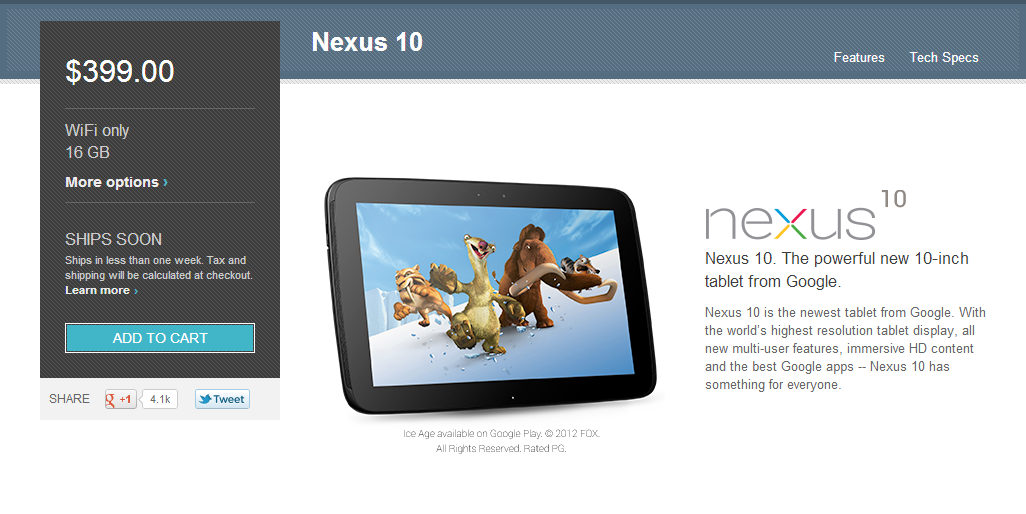
Like riding a roller coaster, it seems like ordering Nexus devices from the Play Store is full of its ups and downs. Today, it's up! At least, for the 16GB and 32GB Nexus 10 for U.S. customers. The two tablets have just gone back in stock via Google's storefront. There is even an encouraging "Ships in less than one week" disclaimer. Ordering seems to be working flawlessly at the moment, though, there isn't a huge rush right now. Still, if you're looking to get one, this would be a good time.
2013-01-02_15h32_33
As you probably already know, the 16GB costs $399 and 32GB costs $499. Customers will be told that they will not be charged until their orders have shipped, however it looks like pending charges may still appear on your account, so be careful if you're planning to order with cards that do not have funds available yet.
Source: Play Store (16GB, 32GB)

Facebook continues urging employees to switch to Android

Monday, 26 November 2012

Back in August we had heard that Facebook was urging its employees, who mostly use iPhones that the company gave them, to switch to Android. The reason behind this was they knew that the Android version of their app sucks and that they wanted their employees to dogfood their app and report back on what’s wrong with it.
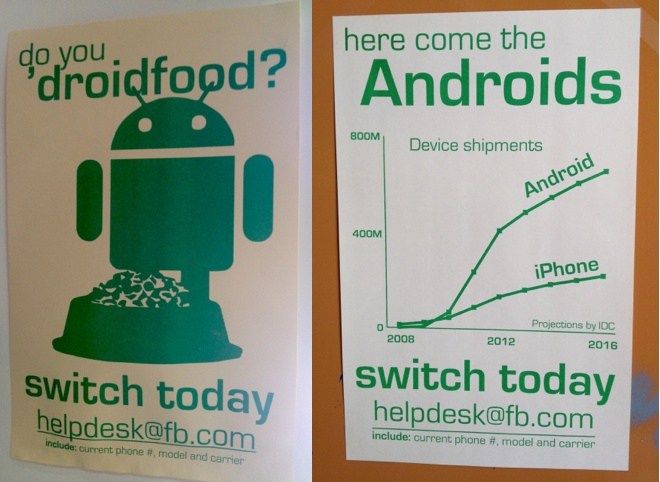
Apparently, Facebook hasn’t given up on that initiative and is continuing to urge its employees to switch to Android, as can be seen by these new posters found on Facebook’s Menlo Park campus.
Facebook employees get to try the latest and greatest versions of the apps before everyone else. Their version also has a feature called ‘Rage Shake’, where the user just shakes their phone when they come across an issue and it gets reported automatically. However, with most of the employees at Facebook using iPhones, they weren’t getting enough data on the Android app to know what’s wrong with it, so this initiative for asking the employees to switch is a step to correct that problem.

Google Nexus 4, Nexus 10 dissected secrets revealed (including a dormant LTE chip)

Saturday, 17 November 2012

Just days after the latest Google Nexus products hit the streets, a couple of repair shops have taken apart the Nexus 4 smartphone and Nexus 10 tablet to see what lies beneath the surface. And they’ve posted teardown guides online.
iFixit Google Nexus 4 teardown
Nexus 4 secrets
The Google Nexus 4 features a 4.7 inch screen, a quad-core processor, 2GB of RAM, an 8MP rear camera, 1.3MP front camera, WiFi, Bluetooth, GPS, NFC, and HSPA+.
But iFixit found something else hidden in the case: a 4G LTE chip.
The Nexus 4 has taken a fair share of criticism for not supporting LTE, but it looks like manufacturer LG actually left in the same wireless chip used in its Optimus G smartphone. Unfortunately it may not be connected to an antenna or power amplifier, so it’d take more than a software update to enable LTE.
Overall, iFixit gives the device a fairly high repairability score since it’s not that difficult to disassemble. But replacing the battery or screen will be more difficult than on some other phones.
Google Nexus 10 teardown
The folks at Powerbook Medic report that the Nexus 10 is pretty easy to take apart — provided you have the proper tools, including a flat tool that you can use to pry open the case without damaging it.
Google Nexus 10 Powerbook Medic teardown
Like most tablets, the Nexus 10 is primarily screen and battery on the inside. I’m always a little surprised at how small the system board is, until I remember that this sort of tablet basically has the same guts as a modern smartphone… but a larger battery to help power the larger display.
via Engadget

LG Nexus smartphone expected to be announced on October 29

Thursday, 11 October 2012


The LG Nexus smartphone rumors are coming in thick and fast, with each one adding a new piece to the puzzle that is very close to being complete.
First off, there are couple of new pictures as seen below that show the phone in a better light. The back says 'with Google' that has raised a few questions, as Nexus phones usually have just the Google logo on the back. Then again, this is not a final product so the back could change by the time it releases. In fact, from what we have heard, the actual phone has a Nexus logo, with a big multi-colored 'X' in the middle.

Next bit of rumor pegs the worldwide launch date on October 29. This bit of information comes from a French publication Le Figaro. They also say that France itself will get the phone around December.
The next bit of info comes from Carphone Warehouse's inventory listing, that suggests that the phone will be called the LG Nexus 4 (which, just for the record, is an infinitely better name than LG Optimus Nexus) and that it will be sold in black and white.

Lastly, there is some disappointing bit of information regarding the internal storage of the phone. It is being said that the phone only has 8GB internal memory and just like previous Nexus devices there is no microSD card slot. If true, it will be an absolutely appalling decision on Google/LG's part. 8GB is way too less for a handset that otherwise sports top notch specifications. We honestly doubt Google/LG will ship the phone with so little memory and think this specification could be changed by the time the phone is announced.
We'll continue to put our ears to the ground and report anything new learned about this device.

News : Google Play Music, Movies now available on Google TV devices

Tuesday, 9 October 2012

Google is taking another step to bridge the divide between its Android and Google TV platforms. You can already download some Android apps on a Google TV set-top-box using the Play Store. Starting today you’ll also be able to access the Google Play music and movie stores.
Google TV Play Store
Just like on Android phone or tablet, you can now purchase music and stream it from the web using a Google TV device. You can also rent or purchase movies or TV shows.
Google is also adding Google Play media to its TV & Movies search app, so when you’re looking for a title you’ll get results from live and recorded TV broadcasts as well as Google Play, Amazon, Netflix, or other apps.
Content you’ve previously purchased using another device will also automatically be accessible via Google TV.
Since Google TV is basically a redesigned version of Android built for television displays rather than phones and tablets, the only really surprising thing about today’s move is that it took so long for Google to make it.
The company says the software update rolling out today also lets app developers offer automatic updates, subscription billing, and “smart app updates,” which means that users won’t have to re-download the entire app every time there’s a new version. Instead they’ll just download the updates, which helps conserve bandwidth.
via Engadget

Kindle Fire HD: Using alternate app launcher, Google Talk without root

Saturday, 22 September 2012

The Amazon Kindle Fire HD hacks/tweaks keep coming. We’ve already seen that it’s possible to root Amazon’s latest tablet, install the Google Play Store, or even install some Google apps without rooting.
Now some early Kindle Fire HD users have figured out how to install an alternate home screen launcher app and get Google Talk up and running without rooting your tablet (and potentially messing up the operating system).
adw launcher ex on the kindle fire hd
Installing an alternate launcher
The Kindle Fire HD runs Android 4.0.3 — but you’d never know that by looking at the home screen or app launcher. There’s no room for widgets, no dock at the bottom, and a carousel showing large icons for recent apps.
But it is possible to replace the Kindle Fire HD launcher with a standard Android launcher… as long as you can find one that works. So far it looks like many popular options such as Nova Launcher, Apex Launcher, Go Launcher, and Zeam do not work.
But the eBook Reader reports that ADW Launcher EX does work. Unfortunately there are a few problems.
First, it’s a paid app — and you’ll have to figure out a way to get the installer file onto your Kindle Fire. The simplest method is probably to buy the app on another Android phone or tablet, backup the APK using Titanium Backup (if you have root access), and then manually copy it. OK… maybe that’s the simplest way if you already have another Android device that’s rooted…
Anyway, the other problem is that while ADW Launcher EX lets you customize your home screen with a dock, widgets, and just the icons you want, it won’t actually replace the Kindle’s default home screen. Pressing the home button will always take you back to Amazon’s home screen.
You can tap the ADW Launcher EX icon any time you want to switch to that home screen though — so if that’s really important to you, I guess that’s something.
The good news is that you don’t need to root your Kindle Fire HD to install the launcher.
Installing Google Talk 
We already knew that you could install Google Maps, YouTube, Gmail, and Currents on the Kindle Fire HD without root access. But it looks like you can also install Google Talk. It just takes a little more work.
That’s because in order to get Google Talk up and running you also need to install the GoogleServicesFramework utility.
Xda-developers member alkemist80 has posted download links for both. The GoogleLoginServices.apk is also included, and may come in handy.
Google Talk may log you out when the tablet goes to sleep, but as long as you log back in manually, you should be able to chat away using Amazon’s $199 tablet, no root required.

News: Google cracks down on “incompatible” versions of Android

Saturday, 15 September 2012

This week Acer planned to launch a new smartphone in China running Aliyun OS. But Google appears to have put a stop to it — and now the California-based search giant is explaining why.
Acer CloudMobile
Aliyun OS  is a mobile operating system developed by Chinese e-commerce giant Alibaba. It’s based on open source Android code, but it’s been modified to look and feel different, and it’s designed with an emphasis on web apps in addition to native Android apps — although it runs some of those as well.
Given Alibaba’s importance in the Chinese market, it’s not surprising that Acer and other handset makers are looking at Aliyun OS.
But Acer is also a member of Google’s Open Handset Alliance. Members pledge to take certain steps to, among other things, make sure that their Android devices meet certain compatibility standards.
That’s why Android phones from HTC, Samsung, and Motorola may look very different, thanks to Sense, TouchWiz, or Motoblur skins running on Android — but they’ll all still run pretty much any Android app you can throw at them.
As members of the Open Handset Alliance, device makers get early access to code from Google as well as the ability to include some of Google’s software that’s not open source, such as the Google Apps suite including Google Maps, Gmail, and the Google Play Store.
This week reports surfaced that Google had pressured Acer to cancel its plans to launch an Aliyun OS phone. Google’s Android head Andy Rubin says that’s because Aliyun OS isn’t compatible with Android, even though it’s based on Android source code. He also published a blog post explaining the company’s take on compatibility.
In a nutshell, Android is available as open source software and anybody can do anything they like with it. So there’s no problem with Alibaba developing Aliyun OS or Amazon developing the Kindle Fire OS on top of Android.
But if companies like Acer want to stay part of the Open Handset Alliance, they have to promise not to contribute to forks of Android that are incompatible with the main branch. They can build as many Windows Phone or other competing handsets as they like — but Google is implying that it could boot them from the Alliance if they ship devices with Android-based software that’s been modified so heavily that it can’t run standard Android apps.
If you’re wondering why Google is cracking down on Acer and not, say, Amazon, there’s a good reason. Amazon isn’t part of the Open Handset Alliance.
While Alibaba claims that Aliyun OS doesn’t need to be compatible with Android, because it’s not Android, it’s close enough to cause concern for Google. The company is trying to build an ecosystem that allows millions of devices to run the same apps.
As Linux blog Muktware points out, compatibility has long been a problem with various Linux distributions. There are hundreds of different Linux-based operating systems including Ubuntu, Fedora, OpenSUSE, and many, many others. While many can run the same open source apps (such as Firefox, LibreOffice, or Pidgin), you can’t just take an app designed for Ubuntu and run it on Fedora. So if a developer like Angry Birds creator Rovio wanted to make a title for “Linux,” which should they choose? Or should they develop a dozen versions?
One answer is clearly to just release the source code and let enthusiasts port the software to run on all operating systems. But that’s not something every developer is going to want to do. So by trying to enforce compatibility, Google is hoping to make sure that TouchWiz, Sens, and other versions of Android aren’t as different as Puppy Linux and Arch Linux. In the process, this could help keep one of the most popular mobile operating systems popular with both users and developers… while Linux continues to hold a distant third place in the desktop operating system world, behind Windows and OS X.

[ROM/NEWS]Google releases full factory Jelly Bean image for the Nexus 7 tablet

Saturday, 30 June 2012

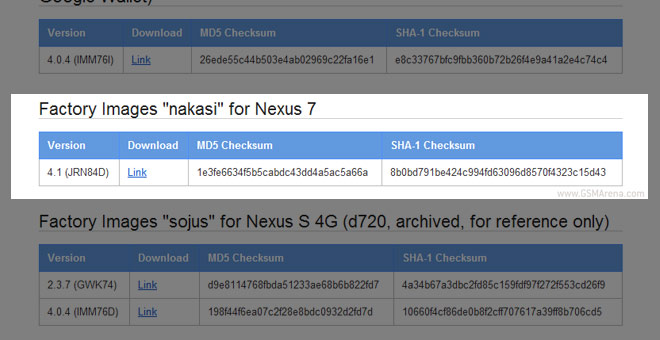
Google may not be seeding Jelly Bean to users until mid-July, but the company’s Android team has already uploaded the factory image of the Nexus 7 tablet online.
The image should be extremely useful to developers, who might start cooking ROMs based on it and users who need to bring their Google Nexus 7 tablets to stock, in case the hacking goes wrong. It’s interesting to see that Google has given the Nexus 7 the codename “nakasi”.
A quick search showed that Nakasi is actually a popular music form in Taiwan, unlike the previous Galaxy Nexus phones codenames, which were named after fish.
We also expect developers to take advantage of this image and create Jelly Bean ports for some of the other Android tablets out there. Looks like Android fans will have to wait for the Galaxy Nexus images for couple more weeks, though.
Head to the source link below to get the Nexus 7 stock Android image.

[Review]Google Nexus 7 and Android 4.1

Friday, 29 June 2012


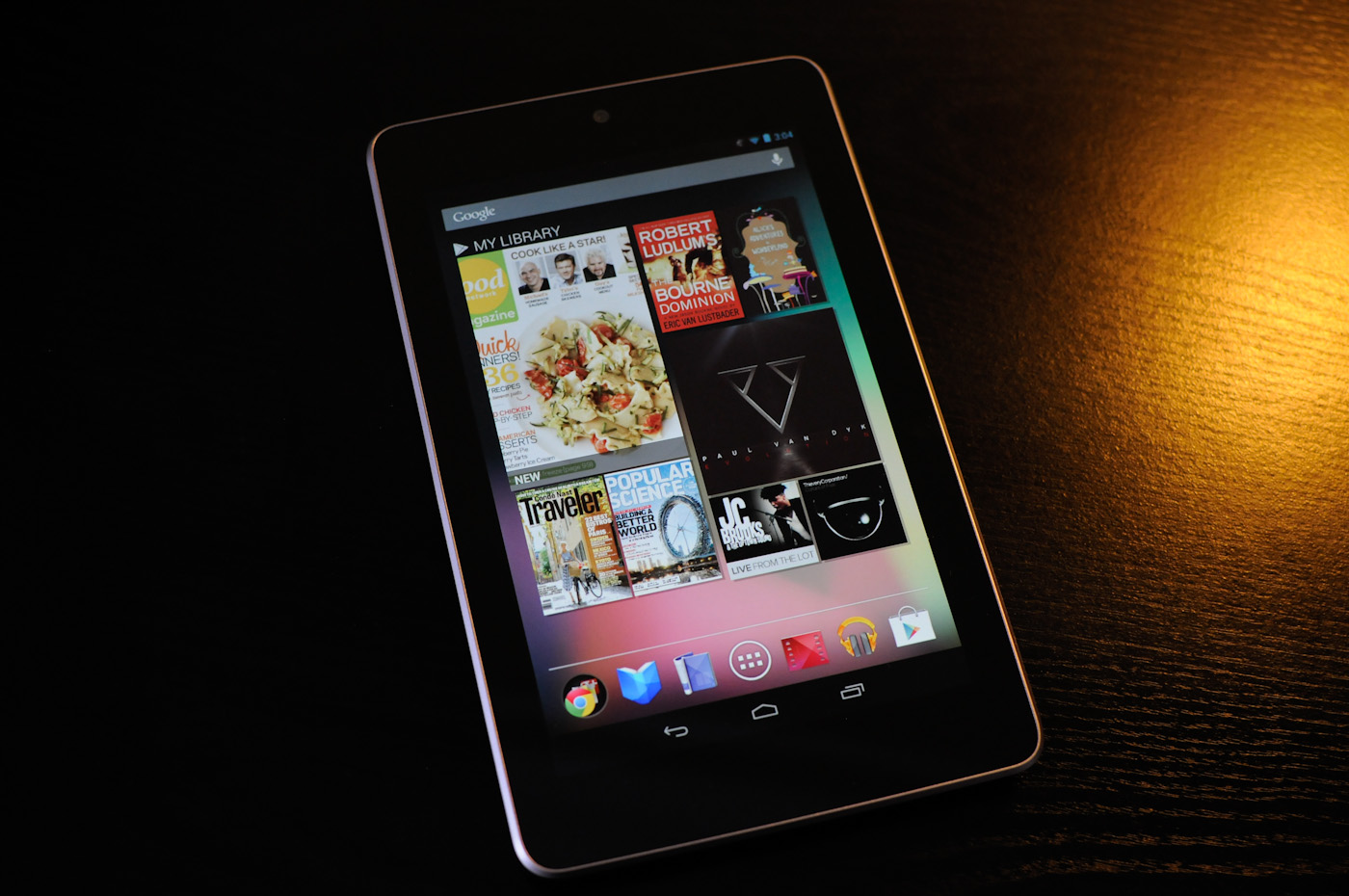
The fact that Google launched a 7" tablet by ASUS isn't a particularly huge surprise, given that ASUS showed off the Eee Pad Memo back at CES. The story goes that Google liked that particular tablet so much, it became slotted in to become the first Nexus tablet, much to Samsung's chagrin. While there have been other "Google Experience" tablets before (for example the Motorola Xoom), there hasn't been a bona-fide Nexus tablet yet, and especially not one at an aggressive price point like this. For that, enter the Nexus 7.
The Nexus 7 comes with Android 4.1 Jelly Bean installed, which we're going over on the next page. It brings improvements to UI performance through Android 
Most important is the Nexus 7's price point, which up until now has largely been one of the main issues with Android tablets - price. It's fair to say that the Kindle Fire has done a good job proving that there is indeed a market for lower cost, simplified tablets at an aggressive price point, and the Nexus 7 is Google's answer. Pricing for the Nexus 7 is $199 for the 8 GB model, and $249 for the 16 GB model. There aren't any other differences between the two, nor is there a model with cellular connectivity – this is strictly WiFi only, but again, this is a tablet for the masses without the carrier hurdle. 
ASUS Tablet Specification Comparison
 ASUS Transformer Pad InfinityASUS Transformer Pad 300 SeriesASUS Eee Pad Transformer PrimeASUS Nexus 7
Dimensions263 x 180.6 x 8.4mm263 x 180.8 x 9.9mm263 x 180.8 x 8.3mm198.5 x 120 x 10.45mm
ChassisAluminum + Plastic RF StripPlasticAluminumPlastic + Rubber back
Display10.1-inch 1920 x 1200 Super IPS+10.1-inch 1280 x 800 IPS10.1-inch 1280 x 800 Super IPS+7" 1280 x 800 IPS
Weight594g635g586g340 g
Processor
1.6GHz NVIDIA Tegra 3 (T33 - 4 x Cortex A9)
NVIDIA Tegra 3 (T30L - 4 x Cortex A9)
1.3GHz NVIDIA Tegra 3 (T30 - 4 x Cortex A9)1.3 GHz NVIDIA Tegra 3 (T30L - 4 x Cortex A9)
Memory1GB DDR3-16001GB1GB1 GB
Storage32/64GB + microSD slot16GB/32GB + microSD slot32GB/64GB + microSD slot8 GB / 16 GB
Battery25Whr22Whr25Whr16 Whr
Pricing$499/$599$379/$399$499/$599$199/$249
When you look at the above specs, it seems puzzling that ASUS was able to get the price down to $199 so effectively. Getting to that lower price point is easier with a few things - physically smaller device and display, exclusion of full size USB or other ports (there's only microUSB), no rear facing camera, and good commodity component sourcing. The added plus is that if you run 1280 x 800 at a smaller size, out comes a pretty high DPI panel at the same time. Other than that though, you end up getting a device which is actually very impressive otherwise, with a quad core SoC and attractive form factor.
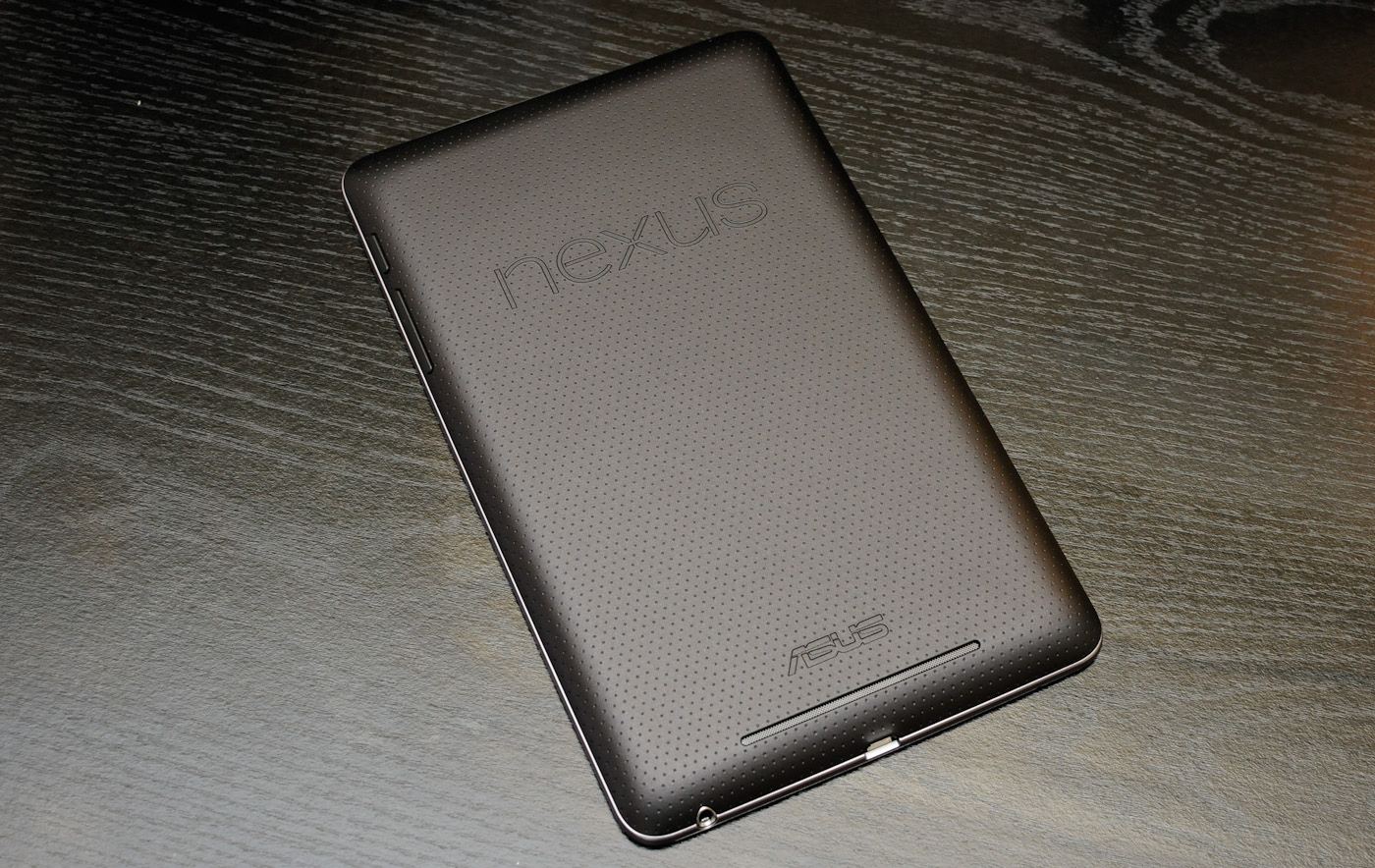
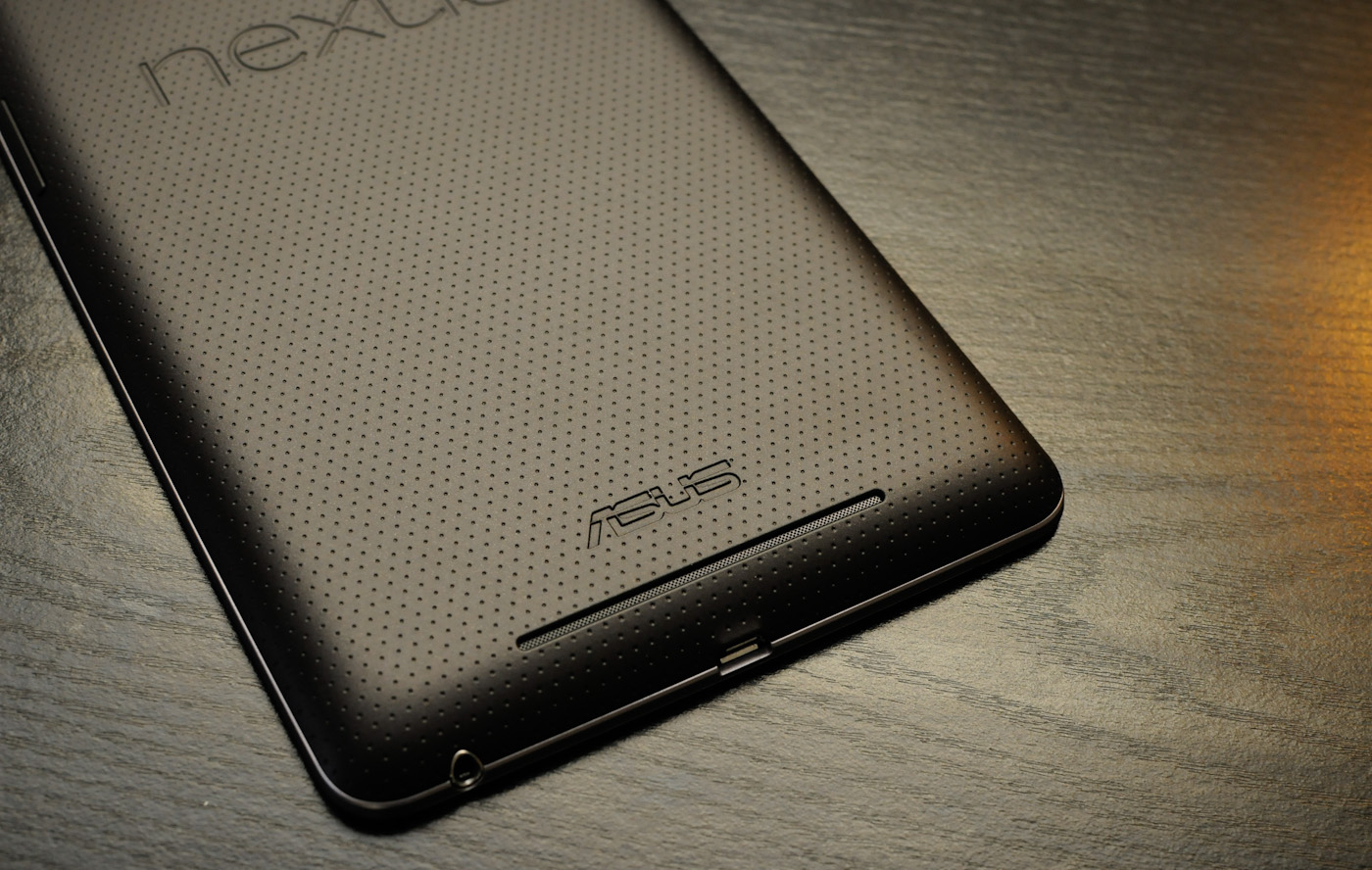
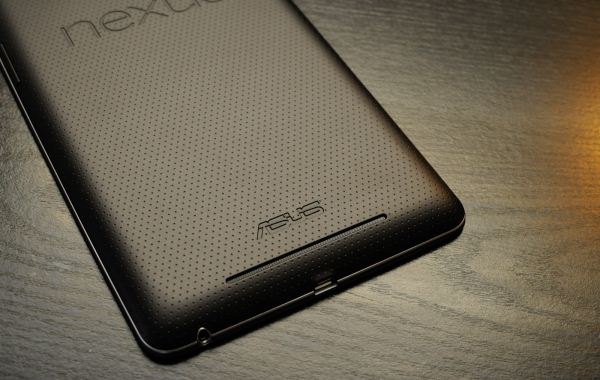
I like starting with physical impressions since it's the easy route, and so much of one's experience with a given device depends on that ever important in-hand feel. ASUS has taken an excellent direction here and made the back construction of the Nexus 7 a great textured rubber material. There's Nexus embossed in the top, and ASUS proudly at the bottom. Below that is a small notch for the speaker, which goes pretty loud. 
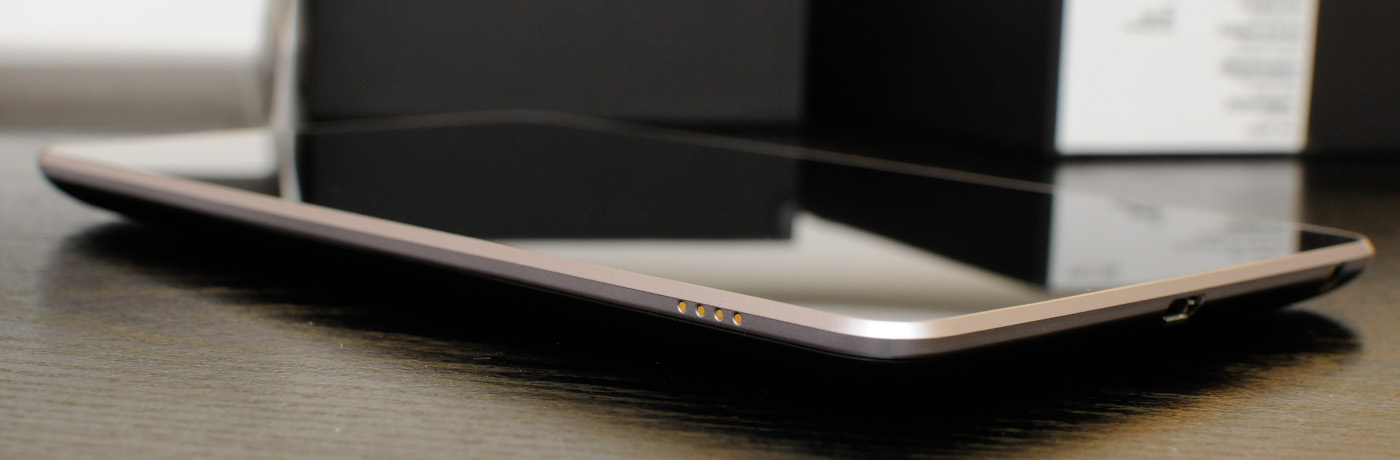
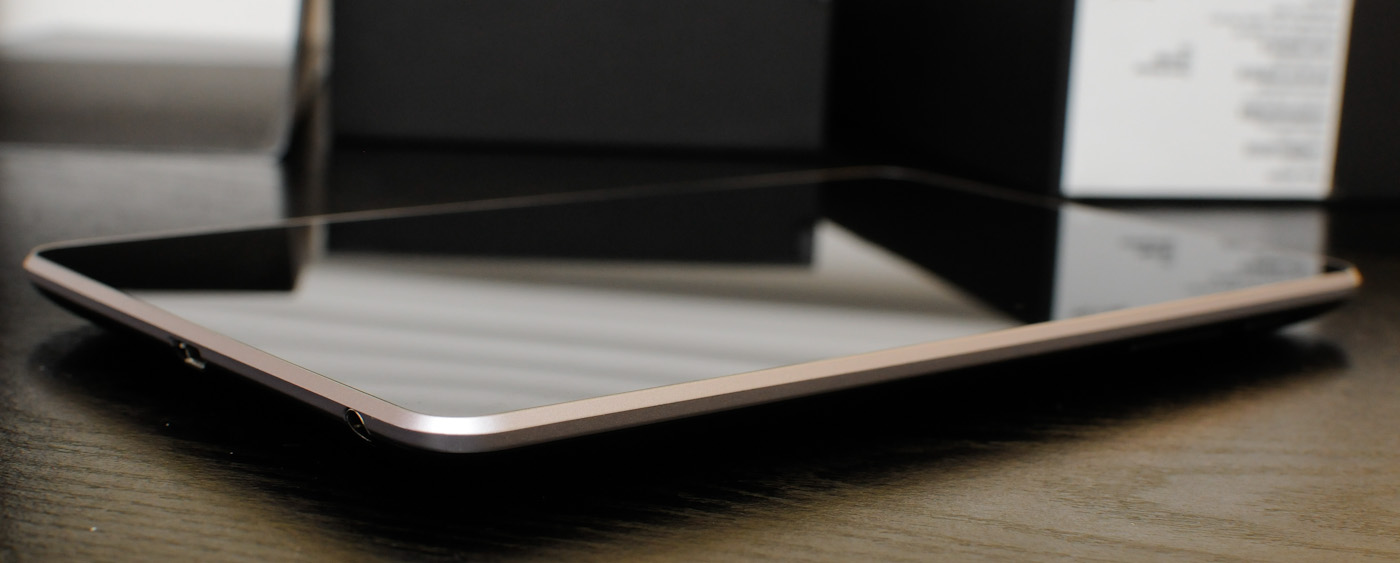
The power / lock and standby buttons get placed on the top right corner, and both microUSB and the headphone jack are located at the very bottom. There are also some pogo pins on the bottom left, just like the Galaxy Nexus. No doubt these will work with some future unannounced accessories.
The Nexus 7's construction is downright impressive. While I haven't been doing regular tablet reviews (that has become Anand's domain largely), I have handled a number of recent tablets big and small, and some feel downright cheap to me thanks to the back plastic. I would not have guessed that the Nexus 7 is a $199 device based on how it feels. There's no flex or creaking at all, it feels absolutely rigid. The tradeoff is that the Nexus 7 is slightly thicker than some other devices, at almost 10.5 mm (compared to 8.5 or 9), but that larger thickness also permits a bigger edge bevel radius. I feel that 7" is an ideal tablet form factor for me personally. 
So the next logical question is what performance is like on the Nexus 7. I asked around, did my own digging, and wound up confirming that what's inside the Nexus 7 is indeed a Tegra T30L SoC. This is a lower leakage / lower binning T30 that no doubt is offered at a cost advantage to ASUS - I was expecting a T30L inside and am wholly unsurprised to see one. The only difference is that CPU clocks are 1.15 GHz for all four cores at 100%, or 1.3 GHz on a single core. The GPU clock is also slightly lower at 416 MHz. The Nexus 7 also ships with 1 GB of RAM, and I'm pretty certain this is DDR2 at 500 MHz based on what I see from the digging I've done. 
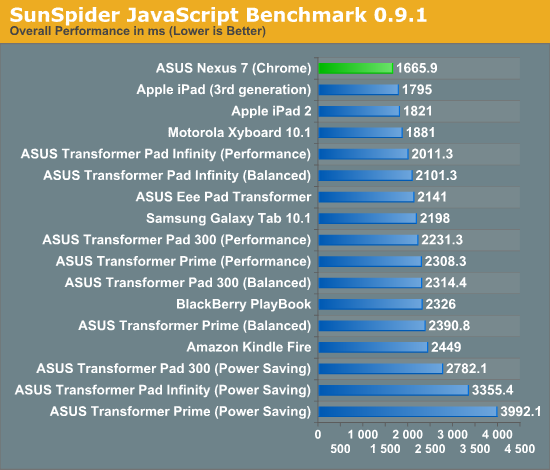
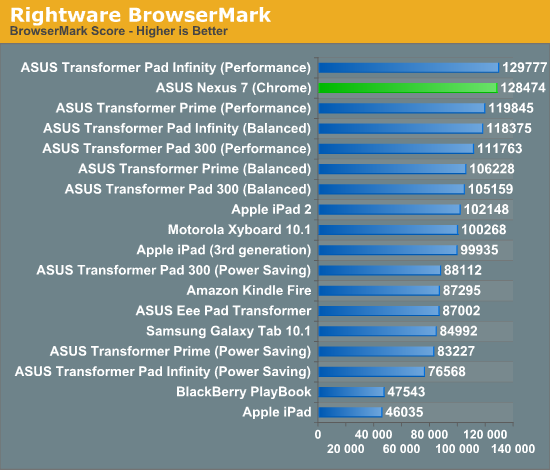
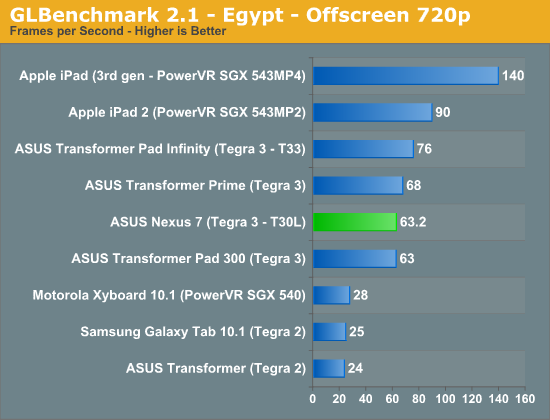
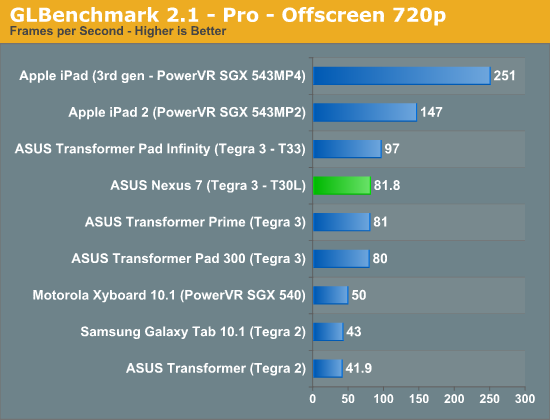
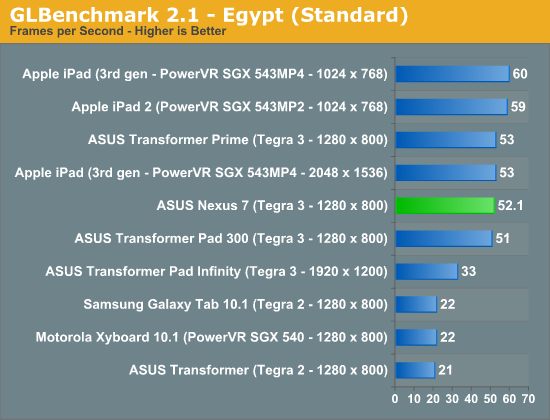
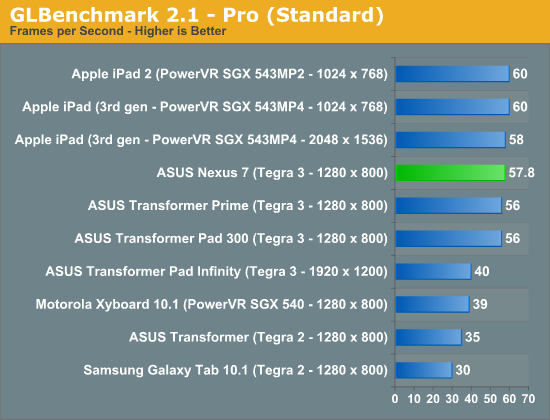
I've borrowed Anand's TF700T review graphs and added data from the Nexus 7 that I hastily ran this afternoon. The results are in line with my expectations for T30L and other devices with T30L inside that we've already benchmarked. 
SunSpider JavaScript Benchmark 0.9.1
Rightware BrowserMark
GLBenchmark 2.1 - Egypt - Offscreen 720p
GLBenchmark 2.1 - Pro - Offscreen 720p
GLBenchmark 2.1 - Egypt (Standard)
GLBenchmark 2.1 - Pro (Standard)
The Transformer Pad 300 uses the same T30L SoC as the Nexus 7, so it isn't surprising to see the two post numbers very close to each other in so many places. 
I should note on the browser synthetics that we're also talking about Chrome here, not "Browser" as the Nexus 7 is the first Android device to ship with Chrome as the default browser. In this case, that means there's no "browser" to be found anywhere on the device. You can still install Flash from the Play Store, it just doesn't do anything anymore.
Speaking of digging, I sent Francois Simond (@supercurio) a voodoo report from the Nexus 7, and he has graciously done a component analysis just like we've done with other devices in the past. There aren't too many surprises inside. WiFi and Bluetooth is courtesy the ever-ubiquitous BCM4330 module, which no doubt has gotten cheaper now that BCM4334 is out. The front facing camera is a Aptina MI 1040 1.3MP CMOS with 3.6µm pixels and 1/3" optical format. NFC comes courtesy a new NXP PN65 controller which is best I can tell a PN544 with embedded SE (secure element). 
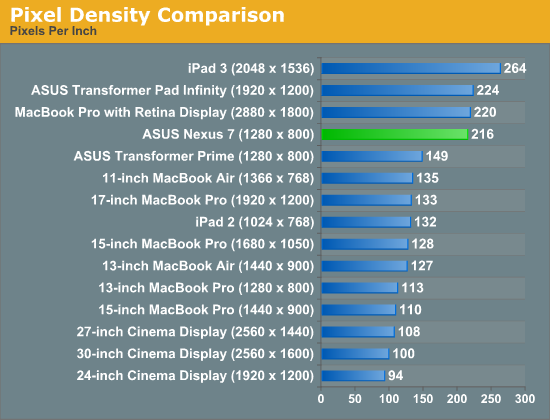
The next question is what that display looks like. We've seen other lower cost tablets ship before, but usually the first thing that gets skimped on is the display. In the case of the Nexus 7, ASUS notes that the panel is an LED backlit IPS panel with 10 point multitouch and 400 nits maximum brightness. Resolution is of course WXGA (1280 x 800) at 7". If you do the math out, that's a pretty high PPI, and in person it looks great - I can't see pixels unless I look very closely. 
Pixel Density Comparison
Since I expected having to do something of a tablet review on this trip to Google I/O, I brought along my i1D2 colorimeter. I took measurements on the Nexus 7 using my normal workflow – a combination of Francois' Voodoo Screen Test Patterns and Color HCFR. 
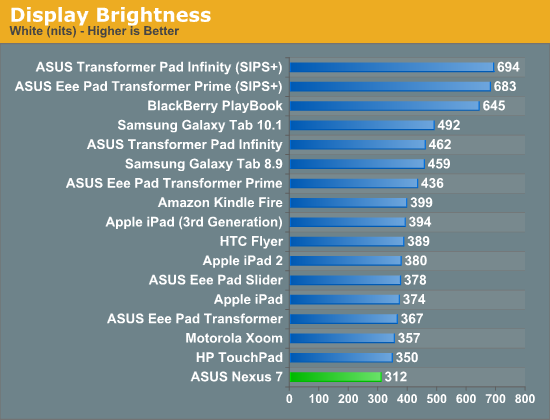
Display Brightness
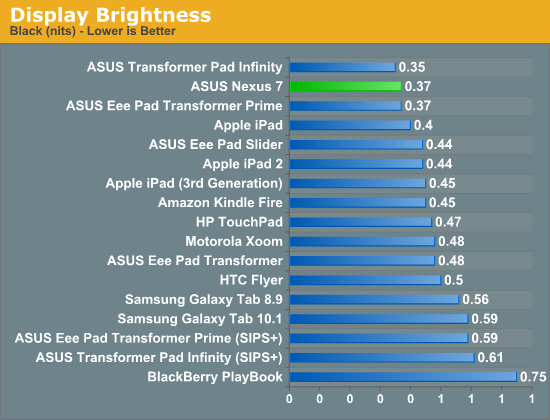
Display Brightness
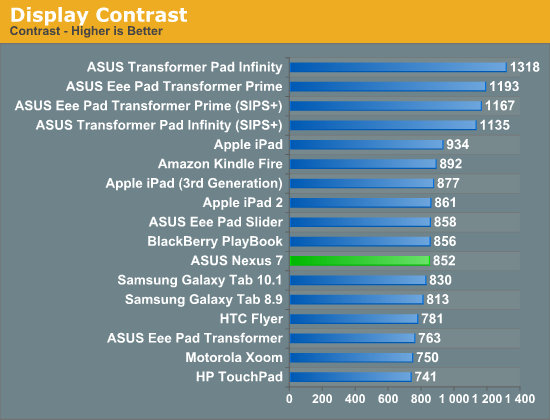
Display Contrast
Brightness falls a bit short of the advertised 400 nits at just 312 nits. I'm actually not sure whether there's some of Nvidia's Prism power saving tech going on here (there's no toggle anywhere for it), but that's as bright as I could get the Nexus 7 to go. Contrast on the other hand is pretty good, at 850, and blacks are very good at 0.37 nits. 
Gallery: ASUS Nexus 7 - Display AnalysisThe rest of the display metrics are a bit interesting, with color temperature hovering around 5500K which is a bit warm for my taste, and gamma isn't flat over the grey scale either. What's really curious to me is that the greens seem undersaturated (the larger triangle is sRGB), which was my first impression on seeing the Nexus 7 while installing some apps from Google Play (which has lots of green). Again I'm not sure whether this is some power saving Prism technique at work here. 
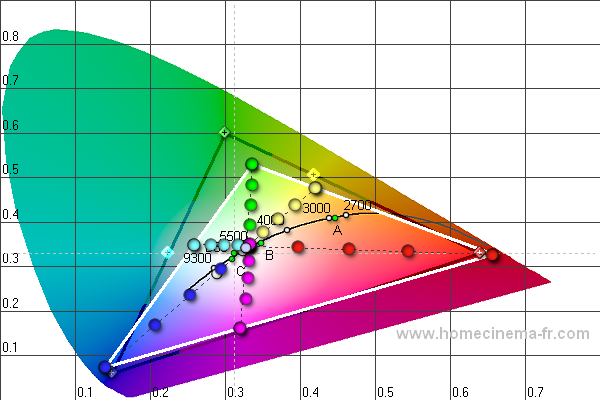
I feel like those metrics could mislead you into thinking the display is bad, on the contrary it's obvious this is an IPS panel based on the viewing angles, which are superb off axis in the horizontal and vertical. You just can't get away with putting a TN in a tablet because of how bad viewing angles are immediately visible on a big surface device like a tablet. The Nexus 7's IPS display is very contrasty and has a high enough PPI that I'm not wishing for higher resolution.
 
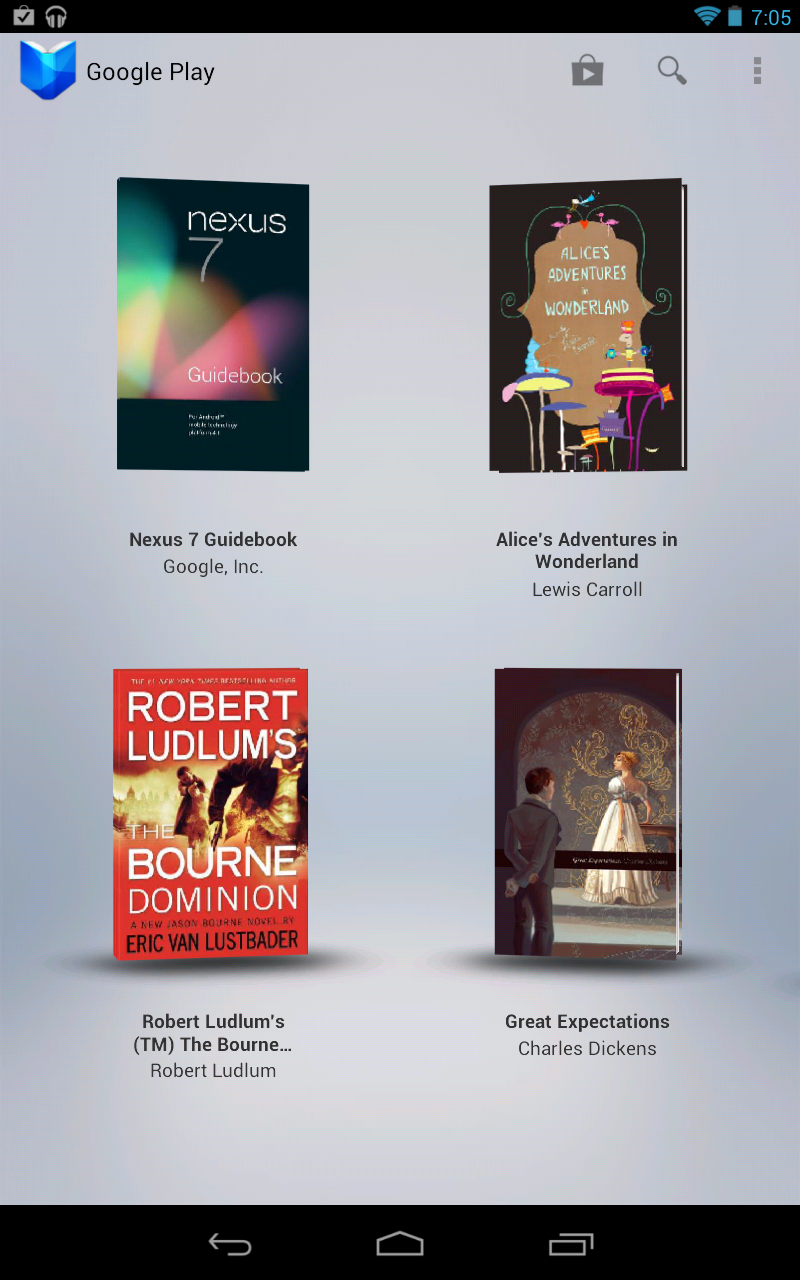
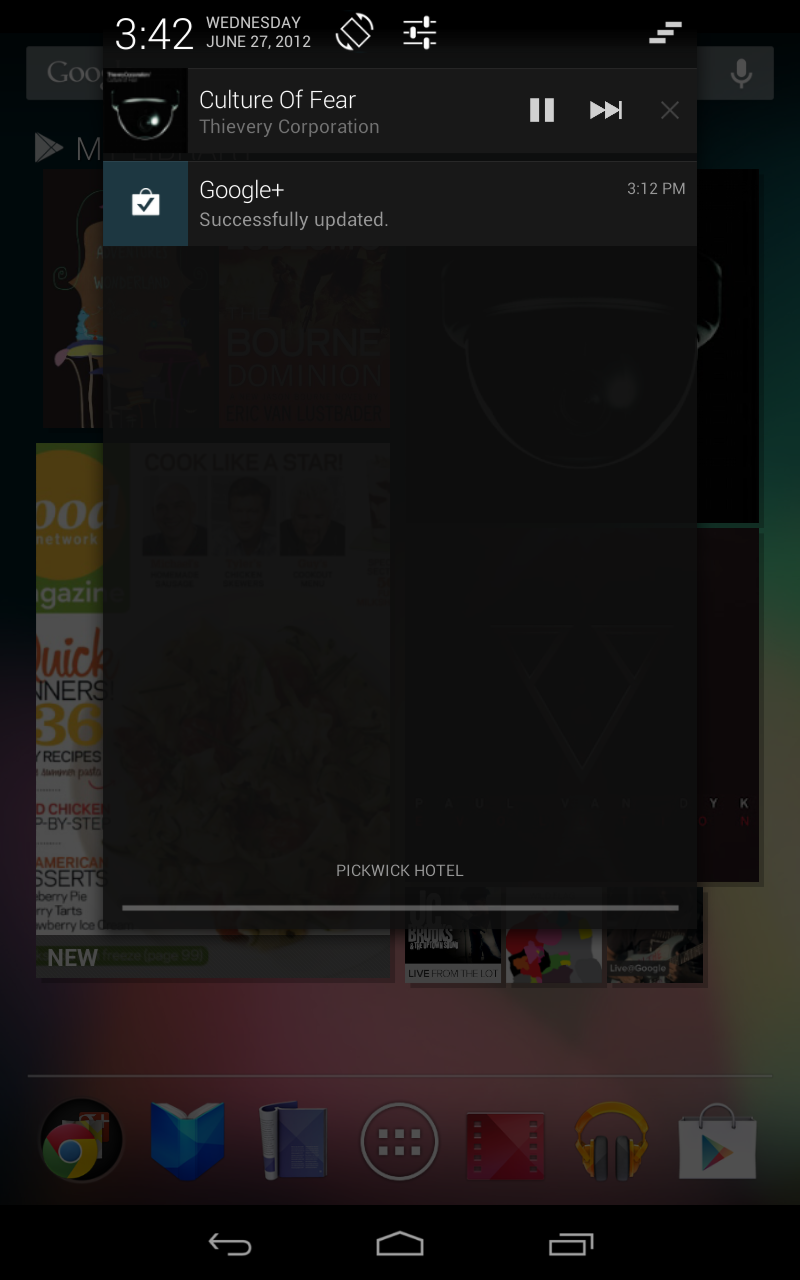
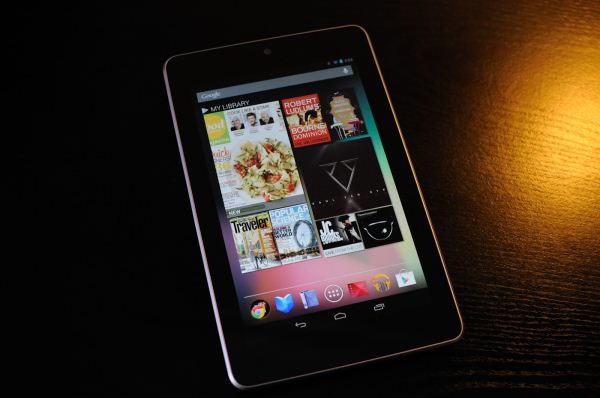
Left - some bundled Google Play books, Right: Notice the new rotation lock toggle on the notification shade, and new style
Google is also doing something interesting with the Nexus 7 by bundling a $25 Play Store credit which pops up in your account after signing into your Google account for the first time. The strategy seems pretty obvious here - get Nexus 7 buyers to at least check out the Play stores. In addition, they've preloaded a number of books and videos which should bait users into at least checking out the respective Google Play applications. 
Honestly I think ASUS and Google have really done an excellent job here with the Nexus 7. The combination of a quad core SoC, IPS panel, solid construction, and the latest version of Android all for such a killer price point pretty much make it hard to really find any faults. Sure, it'd be useful to have a full size USB host port, microSD slot (though no Nexus has shipped with one since Nexus S), 5 GHz WiFi (Nexus 7 is 2.4 GHz only), or cellular, but the tablet wouldn't be $199 anymore. I also really feel like the 7 inch diagonal form factor is an ideal one, and the Nexus 7 is quickly growing on me.
Update: I've had many emails and questions about whether USB-OTG (On The Go) is supported on the Nexus 7, and didn't touch on it when I originally hit publish becuause I wasn't entirely sure. I've now confirmed that USB-OTG is supported on the Nexus 7, and works on the current Android 4.1 non-final build that has been sampled. That's encouraging, and I'll test it myself when I get home and to my miniUSB OTG adapter.
Now, what about Android 4.1?

 
DroidXDA © 2012 | Designed by Bubble Shooter