Showing posts with label motorola xoom. Show all posts

Android 4.1 Jelly Bean rolling out to GSM Galaxy Nexus

Wednesday, 11 July 2012

We are not even mid-way through July and Google has already initiated the process of releasing the Android 4.1 Jelly Bean update to Nexus devices as promised at the Google I/O.
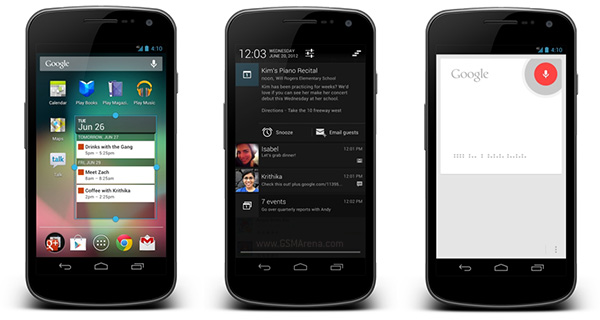
The first device to receive the update will be the GSM variant of the Galaxy Nexus (maguro). Users of this device will see the notification for the update in the next few days. If you are running the version of Jelly Bean provided on the developer units at Google I/O you will still receive this update as it is newer than the developer version.
After updating, you will see all the features shown off at the Google I/O, including Project Butter, Google Now, improved notifications, improved homescreen, improved keyboard, improved camera app and many more.
Other devices such as the CDMA Galaxy Nexus (toro), Nexus S and the Motorola XOOM will receive the update shortly after the GSM Galaxy Nexus.

News : Motorola XOOM Wi-Fi gets Android 4.0.4 update, beats everyone to it

Wednesday, 28 March 2012

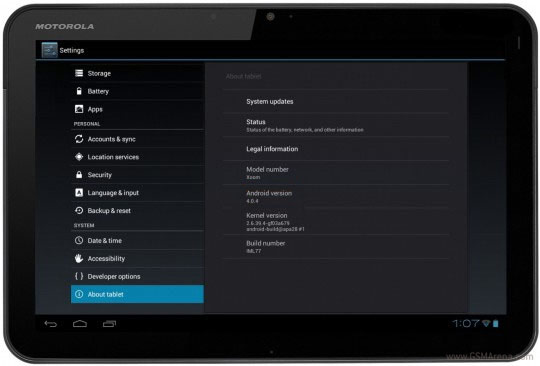
After getting Ice Cream Sandwich in the beginning of the year, the Motorola XOOM Wi-Fi has now beat everyone to the chase, even Google’s own Galaxy Nexus, and has starting to receive an update to Android 4.04.
That being said, the update is incremental and doesn’t bring major new features, rather small bugfixes and enhancements.
Some of them include faster screen rotation, better support for Exchange, improved camera performance in still shots and video and a new option in Settings which allows you to set a delay for the lockscreen after turning the screen off.
There’s no information about Verizon’s version of the XOOM, Galaxy Nexus and the Nexus S getting the Android 4.0.4 update. Motorola has started notifying registered XOOM owners via email for the upcoming over-the-air update, which is scheduled to hit their devices later in the day.

Ice Cream Sandwich Update Rolling Out To Select Motorola XOOMs, Here’s How To Get It Now

Friday, 13 January 2012

How to apply an update.zip to a stock Xoom (3G/WIFI) (with a USB-Host cable)

Hi everyone, I just managed to get my completely stock Xoom updated via USB host-cable... some instructions:


REQUIRED:
USB HOST CABLE
FAT32 USB THUMB DRIVE

3G Instructions:

1) Place the update.zip (can have any filename you like) on the usb stick.

2) Connect the USB stick to the host cable and connect the host cable to the Xoom.

3) Power off

4) Power on, tap (ONLY TAP) volume down a few times until you get a list of options you can cycle through.

5) Select Android Recovery

6) Tap Volume up to boot into recovery

7) Hold power and tap volume up at the green android screen to get the BLUE recovery menu

8) Select apply update from USB drive

9) Select your update.zip from the menu... enjoy!

As for the 3.1 Update, if you get into a boot loop, just hold power and volume up to get out of it.

WIFI ONLY USERS:

There is no menu option for android recovery, you'll need to use:

adb reboot recovery

you can plug in the usb stick at the green android guy screen
Click Our Ads to Thanks Our Share/Work :: http://android.clients.google.com/pa...D.71a21bfe.zip <<download

Motorola XOOM Get Android 4.03 :: How To :: Installation Include

Saturday, 17 December 2011


Motorola XOOM with Android 4.0.3
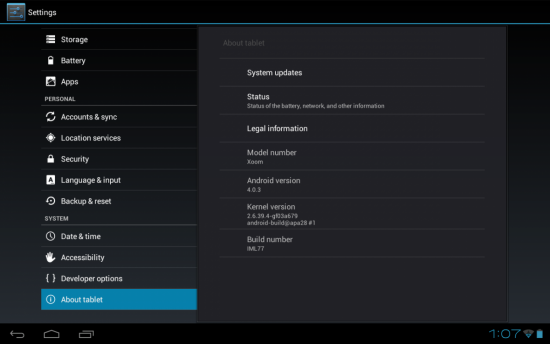
Google released Android 4.0.3 Ice Cream Sandwich this week, and independent developers started kicking the tires right away. It turns out that the software is already pretty much compatible with the Motorola XOOM tablet, and xda-developers forum member razorbladex401 has released a custom ROM for the tablet based on the latest version of Android.
The Motorola XOOM was the first tablet to run Google Android 3.0, and it’s still the closest thing available to an official Google Android developer tablet. SO it’s not surprising that it’s one of the first to support Android 4.0.3.
Motorola and Google will probably push out an official over-the-air software update for the tablet int he coming weeks or months. For now, the unofficial ROM supports most of the tablet’s hardware and offers pretty strong performance. Out of the box it doesn’t yet support the cameras, and the software doesn’t include the Android Market, Gmail app, or other Google apps, but you can install them manually using ClockworkMod Recovery.
If that sounds like too much work (of if you really need functional cameras), you might want to wait for the official release.

FLASH AT YOUR OWN RISK.

These are just the images. It's not an update package. Use fastboot to flash. The camera does not work. There seems to be a green overlay from time to time. There are some missing proprietary binaries that Motorola will have to release.

I haven't tested it out much. Just finished the build and uploaded.

Update #1:

I included the recovery image. Probably don't need to install that.

Update #2
Running another build (kicked it off at 10:10 PM EST). Going to see if I can fix the "green" issue. Stay tuned.

Update #3
There was an issue with my device tree. The green overlay is gone. Still no camera. Download second build. Removed the Honeycomb bootloader. Has the regular old android bootloader.

Update #4
Created CWM flashable package. I've only tested it using Rogue XM Recovery 1.3.0, but it should work with CWM. Ignore the Offset error. Will still boot. Don't forget to do a wipe of your data and cache.

Update #5 (12-17-11)
Thanks to anidrin for posting a link to root. I have confirmed that it works. Install through CWM.

Install:

fastboot -w
fastboot flash boot boot.img
fastboot flash system system.img

Download:
First Build: http://www.mediafire.com/?qr4j4ta49rvny8u
Second Build: http://www.mediafire.com/?8yhsjgm4i7bdcpc

CWM Package:
http://www.mediafire.com/?t7uo5tu796rhcx5


Google Apps:
http://www.mediafire.com/?1l4ravroiwt4ybw

Root: (thanks, anidrin for this)
http://forum.xda-developers.com/show...&postcount=159 (link to post)
http://www.megaupload.com/?d=S67I9Q0L (link to download)

PC World – June 2011

Monday, 12 December 2011

 Tegra 2 XOOM Tablet or A5 Tablets or HP touchpad ?
Read this review and find the best tablet for yourself
Can Any Tablet Beat The IPAD?


Working Download Link :: 
http://www.uploadstation.com/file/Kb48jEF/P.W.2011.06.rar

 
DroidXDA © 2012 | Designed by Bubble Shooter