Showing posts with label ray. Show all posts

[Rom][Ray][XSP {-==-}HTC Sense 4.1 Chinese New Year Edition? Released

Monday, 11 February 2013


If your are noob then please head to other's rom not this sorry 

Code:
#include 
/*
 * Your warranty is now void.
 *
 * I am not responsible for bricked devices, dead SD cards,
 * thermonuclear war, or you getting fired because the alarm app failed. Please
 * do some research if you have any concerns about features included in this ROM
 * before flashing it! YOU are choosing to make these modifications, and if
 * you point the finger at me for messing up your device, I will laugh at you.
 *
 * Submitting bug reports on nightly builds is the leading 
 * cause of male impotence.
*/

THIS BUILD IS FOR XPERIA Ray

Quote:
Quote:

Our Support Page 
This Is A Xperia Sense Project (XSP) for Xperia 2011' Series
Device Included :


Working Sense 4.1
  • Booting
  • Apps and Game Installation
  • Full Sense 4.1 files
  • Adb & Debugging
  • Touchscreen (Multitouch)
  • Sound
  • Camera (Awaiting for patch)
  • Sd Card (Native)
  • RIL 2G & 3g (Manual APN)
  • Wifi (Except Play & Neo L,Fix is under testing)
  • Google Play
  • Mounting via 3rd Party
  • Charging
  • GPS
  • Vibration
  • MIC
  • Root


Changelog
Beta Rev0.1
  • Complete New Sense 4.1 Full
  • RIL Patches
  • Sd Card Work Natively
  • Updated Beats files
  • Complete Reworked Framework
  • SuperSu now working
  • Downloading and Installing via Google Play
  • Apn?
  • More in this Rev0.1
  • Working and Stable Build
  • Chinese New Year Edition
  • Droid Dna Bootanimation
Download :

  • Download the XSP.zip (ArC) & Your Device XSP Patches(If it's not Xperia Arc/S)
  • Fastboot the kernel included on the build or (From your device patch files)
  • Backup your /data contents: contacts, apps, sms, etc. or backup via recovery
  • Move the XSP the root folder of your sdcard.
  • Enter CWM and:
  • - Select 'backup and restore -> Backup'
  • - Select 'wipe data/factory reset' (MUST DO)
  • - Flash the zip. To do this, Select 'install zip from sdcard -> choose zip from sdcard' and select the XSP.zip
  • - Flash patches (if you devices it's not the xperia arc
  • Reboot (first boot will take ~5 mins)


Download Link : Here Beta Rev 0.1 Patch

New firmware (4.1.B.1.13) certified for 2011 Xperia handsets

Tuesday, 11 December 2012


Sony has some new firmware on the horizon for the 2011 Xperia handsets. Firmware version number 4.1.B.1.13 is likely to be a new version of Android 4.0.4 Ice Cream Sandwich. It has been certified for all 2011 handsets apart from the Xperia PLAY. We have no idea what improvements it will bring over the current firmware (4.1.B.0.587), but as it’s the first new firmware in months, we expect bug improvements and maybe some significant enhancements too. 
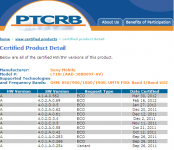
Thanks jlmcr87!

[Dev][Rom][WIP][Ray]HTC Sense 4.0 port for Xperia [XperiaSenseProject][26/10/2012]

Friday, 26 October 2012


This No Theme Or Badass noobies Rom To Play & Have Fun With
This Is An Preview/Pre-Alpha ROM release to developers community
If your are noob then please head to other's rom not this sorry 

Code:
#include 
/*
 * Your warranty is now void.
 *
 * I am not responsible for bricked devices, dead SD cards,
 * thermonuclear war, or you getting fired because the alarm app failed. Please
 * do some research if you have any concerns about features included in this ROM
 * before flashing it! YOU are choosing to make these modifications, and if
 * you point the finger at me for messing up your device, I will laugh at you.
 *
 * Submitting bug reports on nightly builds is the leading 
 * cause of male impotence.
*/

THIS BUILD IS FOR XPERIA Ray (I don't this device)

This Is A Xperia Sense Project (XSP) for Xperia 2011' Series
Device Included :


As mention this very pre-alpha intend for preview purpose for devs & those not afraid bricking the devices
Mostly just to show that sense 4.0 is working for the Xperia

Working :
  • Booting(On Arc/s) last tested
  • Apps
  • Adb
  • Touchscreen
  • Sound
  • Other's not mentioned is broken

Some FAQ & Question(Must Read)
  1. Dev's Please Fix the problem "bla bla bla" /Can you please fix " bla bla bla"
    - :Faceplam: It's Not Helping At All
    - I don't have all the device even the device used to port is broken and required $$ to fix
    - Mind your words please.Noobies Shuu!
    - I will try to fix but what i think is important
  2. I Have this not working,how?
    -Same as above
  3. How Can I help?
    -As for dev,i reserved post #2 for you guys to submit patch(if working) i will update that post therefore user can have easier way to get it
    -For other's you may donate to me to get my devices back ASAP...to get more faster process to get this build running
    (Mention in #1 is hard for me to make it work as the device i used to port is having ic problem & camera as well)
    -Thanks will be also appreciated
  4. Can i port/rebased/use any part of this rom for my rom?
    -NO..& NO...
    -I released this port & not for someone else to steal my rom for their own fame.
    -Any rom stealing/copying/rebranding/rebasing is not allowed.
    -No permission will be given
  5. Why this build is so buggy?
    -See #1 #2 #3
  6. When can i see a port on other Xperia Device
    -I have two pair of hands and it have limit too..i have line up of miui devices as well
    Do understand a limit,i am free it will get to your device,no worries.

Previous Test Build(Fc's) more buggy look
video : here
screenshot : Here

Credits :
FXP 
HTC : For One V RUU
Other's:
Nick
Those donated


 No Mirroring
Please do consider donating to our devs/clicking adverts
(admin DXDA)
Download 

[NEWS]Android ICS Xperia firmware certified for Xperia arc, arc S, neo V and ray

Tuesday, 3 April 2012


New firmware (4.1.A.0.562) was certified by the PTCRB for four 2011 Sony Xperia handsets – the Xperia arc, Xperia arc S, Xperia neo V andXperia ray. Whilst it is difficult to know exactly what this firmware represents, the likelihood is that this will be the Android 4.0 ICS Xperia update. So why do we think this is ICS?
Well the beta ICS firmware versions for the Xperia arc S and Xperia PLAY were both prefixed 4.1.X.X.X. Also Sony Mobile has confirmed that the first 2011 Xperia handsets to get the Android 4.0 update will be the Xperia arc S, neo V and ray. The only thing spoiling this theory is that the original Xperia arc has also been certified with the same firmware and SM recently confirmed a late May launch for the arc. Either way, this still looks like ICS firmware to us, which means the countdown to Android 4.0 for Xperia users has begun.
Thanks Pratik!

[Rom][RAY][29/03]KA11 Ice Cream Sony released|Best Audio,fast,smooth,Battery Drain fix...


== Working HD games KA08 and above == Tested on Neo ==
Tested and working:
- 9MM HD
- Asphalt 5
- Asphalt 6 HD
- BackStab HD
- GT Racing HD
- Real Football 2011 HD
- Shrek Karting HD
- UNO HD
- Dead Space
- Reckless Racing 2
- Modern Combat 3 (Slow mission loading)
- World of Goo
- Let's Golf 1

==screenshots==
2nd post

==for high speed download from hotfile==
To download the files from hotfile as a premium user:
- Go to www.tomtest.net and register
- Use the multi cookie generator on-line if there are cookies available
- Use cookie manager in Firefox or chrome
- add the new cookie you just generated
- Ready to download at high speed

==features==
- Pre-rooted
- Great Audio Improvement
- 100% Supercharged
- Various tweaks for smoothness, media and battery life
- Swipe to remove notification
- Statusbar widgets
- Based on ICS Beta release from Sony
- Facebook Inside Xperia
- Timescape
- Bravia Engine, xLoud
- Wifi Direct
- SystemUI with widgets
- Face-unlock feature
- New home.apk
- New music, digital clock and analog clock widget
- New default themes
- Some Bloatware Removed
- Stripped of some useless SE apps
- Lightly themed
- Customized Statusbar Icons with ICS icons
- Very battery friendly
- All Gapps updated {Included ones}

== download == KA11 == Fixed rotation and camera issues == 
No more need to Supercharge since it is included since KA10
Mediafire: KA11 Ice Cream Sony Mediafire link
Hotfile: KA11 Ice Cream Sony Hotfile link

== download == Addons == All working with KA11 ==
On screen button enabler, menu button on home screen is positioned a bit high, this is only with stock launcher
- KA10 On screen button enabler v4: KA10 On screen button enabler v3
- KA10 Battery % mod: KA10 Battery % mod
- KA10 Volume buttons to skip track: KA10 Volume buttons to skip track mod This addon will remove screenshot option
- KA10 Auto-rotate home: Auto rotating home
- KA10 default Sony keyboard: Default ICS beta Sony keyboard
- KA11 Timescape: KA11 Timescape
- KA11 Facebook: KA11 Facebook
- KA11 remove Facebook + Timescape: Remove Facebook + Timescape
- KA11 Default Camera: KA11 Default Camera old camera without 720p @ 10Mbps
- Google Gallery: Google Gallery
- Geniewidget: GenieWidget

== download == Kernel ==
Kernel: Kernel with CWM for Ray

==credits==
- Sony for the ICS Beta rom release
- Bin4ry for GSM & Bluetooth
- zackie012 for camera fix
- Night-Elf for the kernel with CWM
- emannxperia for Neo V camera Patch
- Diamond666- for systemUI with widgets KA01 - KA06
- hansip87 for many things (SystemUI and framework mod)
- jjdoctor for many things (Battery fix)
- erkanguness for brightness tweak
- 7OH for Russian framework values and volume buttons to skip track mod


==Installation instructions== KA Ice Cream Sony users ==
Important! Only for unlocked bootloader
Kernel included is the ICS beta kernel with recovery
- copy KA06_Ice_Cream_Sony_Ray.zip to root of sd-card
- choose "Flash zip from sd-card" and choose the KA06_Ice_Cream_Sony_Ray.zip
- Ready to use updated version 

- [optional] again reboot into recovery, go to advanced & fix permissions
I am not responsible for damage to your device, use at own risk!


[ROM][RAY] ICELite BETA1 |AOSP 4.0.3|by zdzihu |FAST|CLEAN|Galaxy Nexus OnScreen Keys|

Tuesday, 28 February 2012


Hi Guys,

I Have managed to Port the ROM by zdzihu to Our Beloved Xperia Ray...Thanks to him for the Awesome ROM.. 
Originally Posted by zdzihu  View Post
Hi guys,

Here's the first release of the ROM I've been working on for some time now. This ROM is based on SEMC framework for compatibility (data connection etc), but introduces fully debranded system. ICELite is designed to be fast, lightweight and stable ROM ready for everyday's use. As usual, this is a BETA release, and I'm not responsible for any herp in case of derp or durr.


ICELite beta1


Summary:
This ROM is a pure AOSP experience without any bloatware. If you need Timescape/Whateverscape, please use the SEMC ICS beta ROM. I am not taking any feature requests - this is going to be barebone Android 4.0.3 without any addons. If you need battery mod/wallpaper/xyz support - please click here

Features:
- Wifi Direct app
- latest Trebuchet launcher
- 0%-battery friendly
- HDMI + FM Radio
- gapps base included (you may download all necessary Google App from the market)

Bugs/Issues:
- I haven't had enough time to port AOSP incall screen, so I included my custom one (thanks SEMC)

Tips:
- setting animation scale to 0.5x (or even disable if you don't need eyecandy) improves overall speed/smoothness a lot

Cheers,
z
Whats Different from Arc Port?
1) Sony Default Camera Included to have both AOSP and SE 
2) ICS Bootanimation with Sound included
3) Removed Terminal Emulator and WifiDirect
3) Face Lock Working and Video Call on Gtalk Working..

Bugs:
*Camera Shutter Sound not working
*LED light cant be used as Torch..
Will release a Fix patch for it (later)

VERY VERY IMPORTANT Instructions:

Please Follow these STEPS otherwise you wont be able to Boot the ROM.

1) Download the ROM and save on SDCard.

2) Turn off Phone and Enter into Fastboot Mode( Attach USB to PC while keeping Volume UP Pressed)

3) Flash the Kernel boot1.img. (It has Built-in Recovery)

4) Turn on Phone, Enter Recovery and Flash the ROM. (This Rom wont Boot if you use Recovery from your present Rom to Flash it.. You have to flash the Rom with Recovery in boot1.img)

5) Turn off Phone by Pulling out battery as Recovery doesn't have Power off Option

6) Enter Fastboot Mode again and Flash boot2.img. (This Kernel Doesn't include Recovery. Its Stock ICS Ray Kernel(untouched)

7) Reboot...

DOWNLOADs
Please Read Instructions before downloading these

1) ROM
2) boot1.img
3) boot2.img
Special Addon 

Galaxy Nexus OnScreen HW Keys(Thanks to kormatoes for this one) 
See Screenshot Below


For Removing On Screen Keys Flash THIS..
.
Camera Led Fix Attached: Flash in Recovery

.
.
.
.

Attached Files
File Type: imgboot1.img - [Click for QR Code] (5.55 MB, 42 views)
File Type: imgboot2.img - [Click for QR Code] (4.42 MB, 49 views)
File Type: zipCamera_LED_Fix.zip - [Click for QR Code] (135.1 KB, 12 views

 
DroidXDA © 2012 | Designed by Bubble Shooter