Showing posts with label ubuntu. Show all posts

CES 2013 : Closer look at Ubuntu Phone OS

Tuesday, 8 January 2013

Ubuntu Phone OS is a Linux-based operating system for smartphones that could show up in handsets that will hit the market in late 2013 or early 2014.
But Ubuntu’s parent company Canonical is already showing off early builds of the software running on the Samsung Galaxy Nexus smartphone — and in the coming weeks Canonical will release software that lets anyone install Ubuntu on a Galaxy Nexus to try the operating system early.
ubuntu Phone OS
While Ubuntu Phone OS shares many visual elements with the Unity desktop environment from the full desktop version of Ubuntu, the OS and the user interface have been optimized for mobile devices.
At this point that means, among other things, that you can’t just install full desktop apps like LibreOffice or GIMP on a device running the Phone OS. But eventually you may be able to do that. While those apps won’t run properly in phone mode if they’re not optimized for that UI, you’ll eventually be able to dock your phone to a keyboard, mouse, and monitor and run full desktop style apps on a big screen.
In other words, instead of synchronizing your music, movies, documents, and other data between your phone and your PC you’ll be able to treat your phone as your PC. Carry it in your pocket and it’s a phone. Plug it into a desktop docking station, and it’s your PC.
It’s an interesting idea, but Canonical clearly faces an uphill battle in making it happen. The company will have to convince handset makers to use the software, wireless carriers to support it, and users to actually buy products running Ubuntu Phone OS.
While an obvious target audience would be folks already running desktop Linux operating systems, the phone OS really feels a lot more like an Android, webOS, BlackBerry, or iOS kind of operating system than traditional Linux. There will be an app store, no official terminal app (that I’m aware of), and an emphasis on apps written in HTML5 or QML.
Canonical is also trying pretty hard to monetize the product. Not only will it involve the same Amazon shopping lens that’s caused controversy in the desktop Ubuntu community, but Canonical also plans to dedicate a portion of the apps menu to “apps available for download,” so it can show promoted apps as a way to generate revenue.
Fortunately, the system is based on open source software, which could make Ubuntu Phone OS much easier to hack and modify than most other smartphone operating systems. So I suspect if and when the software makes it to market, we’ll see an awful lot of third party customizations.

Canonical Announces Ubuntu For Smartphones, Supercharged your smartphone into atomicphone.[Video and Picture]

Thursday, 3 January 2013

While Ubuntu (and Linux as a whole) may not be hugely popular among the consumer desktop computing crowd, it'd be folly to discount the OS as a whole. Especially among the Android developer crowd. Well, if you happen to be among the tech-literate faithful who use open source desktop operating systems to write code for your open source phone operating systems, Canonical would like to make your life a little weirder: introducing Ubuntu for smartphones!
2013-01-02_13h46_21
Not to be confused with Ubuntu for Android, which allowed a docked Android phone to run a more-or-less full version of Ubuntu a la Webtop, this new product is a full-blown smartphone OS, distinct from Android entirely and meant to run all on its own. It uses multitouch gestures and voice control for interaction, and even an app store is in development.
So, how does this relate to Android? Well, for starters, Ubuntu for smartphones is not yet slated to run on any upcoming hardware or carriers, but the company does say that it can be made to run on any recent phone built to run Android, if a manufacturer would like to do so, as it uses Android kernels and drivers. Translation: most companies are probably not going to install this on their hardware, but we can bet that some enterprising dev is going to make it work.
Whether this has any effect on the smartphone market is yet to be seen. As of right now, we have a press release (below) and a promise. This late in the game, the likelihood that Ubuntu will gain any significant market share as a mobile OS is nil to none. However, with a strong ties to server and backend technology, plus an enthusiastic Android development community that has a preference towards open source platforms, it may get a decent level of attention. If nothing else, it would be very interesting to see how the smartphone and PC versions work together. It could serve as a nice model of how to integrate a ubiquitous OS...right Google?
For those of you who want to give it a shot for yourself, Canonical says that downloadable images will be made available for the Galaxy Nexus over the next couple of weeks. So far there aren't any other devices that are officially supported, but we can expect that to grow over time.
Source: Canonical
Ubuntu comes to the phone, with a beautifully distilled interface and a unique full PC capability when docked
· Leading open PC platform with huge global following announces mobile version for network operators, OEMs and silicon vendors
· Fast, beautiful interface for entry level smartphones
· Unique PC experience on superphones when docked with a monitor, keyboard and mouse
· Ubuntu raises the bar for mobile UI design, for richer and more immersive apps
· A single OS for phone, PC and TV
London, UK, 2 January, 2013: Canonical today announced a distinctive smartphone interface for its popular operating system, Ubuntu, using all four edges of the screen for a more immersive experience. Ubuntu uniquely gives handset OEMs and mobile operators the ability to converge phone, PC and thin client into a single enterprise superphone.
"We expect Ubuntu to be popular in the enterprise market, enabling customers to provision a single secure device for all PC, thin client and phone functions. Ubuntu is already the most widely used Linux enterprise desktop, with customers in a wide range of sectors focused on security, cost and manageability" said Jane Silber, CEO of Canonical. "We also see an opportunity in basic smartphones that are used for the phone, SMS, web and email, where Ubuntu outperforms thanks to its native core apps and stylish presentation."
Ubuntu is aimed at two core mobile segments: the high-end superphone, and the entry-level basic smartphone, helping operators grow the use of data amongst consumers who typically use only the phone and messaging but who might embrace the use of web and email on their phone. Ubuntu also appeals to aspirational prosumers who want a fresh experience with faster, richer performance on a lower bill-of-materials device.
The handset interface for Ubuntu introduces distinctive new user experiences to the mobile market, including:
1. Edge magic: thumb gestures from all four edges of the screen enable users to find content and switch between apps faster than other phones.
1. Deep content immersion - controls appear only when the user wants them.
2. A beautiful global search for apps, content and products.
3. Voice and text commands in any application for faster access to rich capabilities.
4. Both native and web or HTML5 apps.
5. Evolving personalised art on the welcome screen.
Ubuntu offers compelling customisation options for partner apps, content and services. Operators and OEMs can easily add their own branded offerings. Canonical's personal cloud service, Ubuntu One, provides storage and media services, file sharing and a secure transaction service which enables partners to integrate their own service offerings easily.
Canonical makes it easy to build phones with Ubuntu. The company provides engineering services to offload the complexity of maintaining multiple code bases which has proven to be a common issue for smartphone manufacturers, freeing the manufacturer to focus on hardware design and integration. For silicon vendors, Ubuntu is compatible with a typical Android Board Support Package (BSP). This means Ubuntu is ready to run on the most cost-efficient chipset designs.
In bringing Ubuntu to the phone, Canonical is uniquely placed with a single operating system for client, server and cloud, and a unified family of interfaces for the phone, the PC and the TV. "We are defining a new era of convergence in technology, with one unified operating system that underpins cloud computing, data centers, PCs and consumer electronics" says Mark Shuttleworth, founder of Ubuntu and VP Products at Canonical.
Canonical currently serves the leading PC OEMs: ASUS, Dell, HP, and Lenovo all certify the majority of their PCs on Ubuntu and pre-install it in global markets. Over 20 million desktop PCs run the OS today, and Canonical estimates that close to 10% of the world's new desktops and laptops will ship with Ubuntu in 2014. Ubuntu is also wildly popular as a server platform, the number one server OS on the key major public clouds and the leading host OS for OpenStack, the open source IAAS.

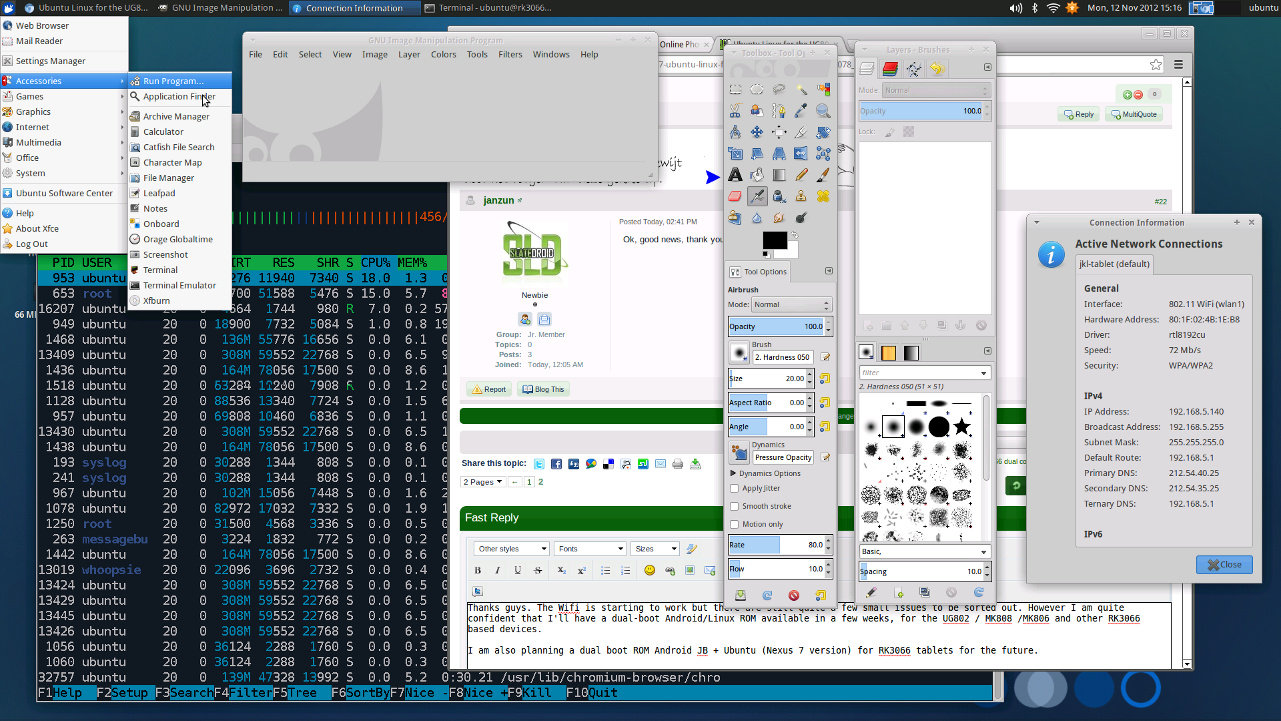
Preliminary Version of Ubuntu Running on UG802 mini PC (Rockchip RK3066)

Monday, 12 November 2012

(AndrewDB) had started working on a port of Ubuntu for the platform. It appears he has been pretty busy, as there has been some progress in the meantime…

Ubuntu Running on UG802 mini PC (Click to Enlarge)
AndrewDB managed to run Ubuntu on UG802 HDMI Stick. Wifi is starting to work, although there are still some minor issues to resolve. He plans to have a dual-boot Android/Linux ROM available in several weeks for RK3066 based devices such as the UG802 and MK808. Eventually, AndrewDB also intends to release a dual boot ROM Android Jelly Bean + Ubuntu for RK3066 tablets.
That’s all the information I have for now. This is still work in progress (See TODO List) and no binary has been released yet.
Via: SlateDroid

[How-To] #MK802 #Ubuntu Images with/without Droidmote

Sunday, 2 September 2012


Here at Miniand we have been hard at work getting Linux images working on the MK802, and we have successfully built Ubuntu, Kubuntu, Xubuntu and Lubuntu images.
We have Droidmote server available through a PPA, so you can control the device using your Android phone.
The current version of the images support Wifi, Bluetooth, gamepads, and have a wide range of other drivers enabled.

Demonstration

http://i.imgur.com/ItvOnh.jpg
http://i.imgur.com/1QpDa.jpg
http://i.imgur.com/SmyUa.jpg

Videos

Download

  • Lubuntu 12.04 v4 A very lightweight version of Ubuntu using LXDE, recommended
    • 1GB 1080p - 307.3MB 8745ae9f3b64ae7c584f461af272a1e5
    • 1GB 720p - 307.3MB 3817c63736135bc24d395f3e81ac96f4
    • 512MB 1080p - 307.3MB 5eb772216410f5c39d3d604c86e7bb63
    • 512MB 720p - 307.3MB e95fec74a314eb77147db58091589b2e
  • Xubuntu 12.04 v1 A lightweight version of Ubuntu using XFCE, recommended
  • Ubuntu 12.04 v1 The standard Ubuntu release using Gnome
  • Kubuntu 12.04 Delayed until next release Ubuntu using KDE as the desktop environment
Other versions:

Installation

Warning: this will erase any current data on the SD card. You need an SD card at least 4GB in size.

Mac / Linux

  • Download the desired image
  • Extract the image, an example using the p7zip CLI is p7zip -d lubuntu-desktop-12.04-4-miniand.com.img.7z
  • Insert the SD card
  • Find which device the SD card is with fdisk: sudo fdisk -l. It will be something like /dev/sdd
  • Copy the image to the SD card with dd, making sure to use the SD device: dd if=lubuntu-desktop-12.04-2-miniand.com.img of=/dev/sdd
  • Make sure the write has finished with sync: sudo sync
  • Put the SD card into your MK802, turn on the MK802 and enjoy!

Windows

  • Download the desired image and extract it with 7-zip
  • Insert your SD card
  • Download Image Writer and write the image to your SD card. Warning: make sure you pick the correct drive as the contents of the drive will be deleted in the process
  • Eject the SD card, put it into your MK802, turn on the MK802 and enjoy!

Usage

General

The default password is miniand.

Droidmote - control using Android phone

  • Boot Ubuntu and connect to a network.
  • Right click on the networking icon in the panel and see connection information, take note of the IP address.
  • Install DroidMote Client on your Android phone or tablet.
  • Open DroidMote Client, go to settings, and set the password to "miniand".
  • Connect using the IP of your MK802.

Changelog

v4 - 2012-07-21

  • Removed Droidmote from the original image since it needs to be updated sometimes. Will package separately as a PPA which will allow automatic updates.

v3 - 2012-07-07

  • The Droidmote developer gave us permission to include Droidmote server with the image, so you can use your mobile phone to control Linux. There will be a .deb download soon for users who downloaded the v2 image.
  • Correctly created image to not cut off the final 1MB.

v2 - 2012-07-06

  • Implemented suzuke's u-boot to unlock 1GB RAM.
  • Using Toby's 3.0.36-t1 kernel with paranoid networking disabled and a large range of drivers enabled. This fixes bluetooth among enabling many other things. Performance increase due to new kernel too.
  • New technique for building image to dramatically reduce download size.

v1 - 2012-06-14

Initial version.

Known issues

  • Hardware video decoding and 3D OpenGL isn't available.
Source Via : Miniland

[ROM] Complete List [OS] Linux distributions that can run on an MK802 Mini PC

Saturday, 7 July 2012

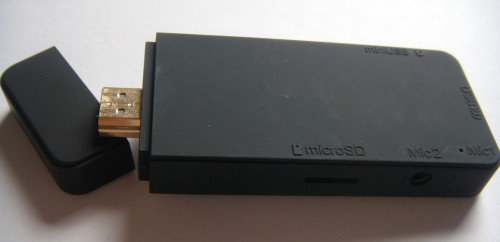
The MK802 is a tiny computer that looks like a USB flash drive, and which ships with Google Android 4.0 and sells for around $80 or less. It’s designed to be something you can plug into a TV to surf the web, watch video, and play games on the big screen.
But over the past few weeks, we’ve also seen a number of Linux-based operating systems ported to the MK802. That’s because it’s very easy to load an operating system onto a microSD card and boot from that card. Pop it out and the MK802 will run Android again.
MK802 running Lubuntu
Software development for the MK802 is still in the early phases. There’s no Linux support for the Mali 400 graphics chip, for instance. But there are already a number of surprisingly useful versions of Linux that can run on the MK802, offering 720 and 1080p screen resolutions, support for Firefox and Chromium web browsers, office suites, and all sorts of other popular Linux software.
Basically, you can pick up an MK802 for $80 or less, plug in a TV, mouse, and keyboard, and you’ve got yourself a fully functional, low power computer that’s not particularly fast, but which also isn’t nearly as slow as you’d expect it to be.
The MK802 has an Allwinner A10 ARM Cortex-A8 processor, 4GB of storage, and is available with 512MB or 1GB of RAM.
The folks at the Rikomagic UK and Miniand forums have been working hard to port different Linux distributions to the MK802. These are all disk imagees which you can run from a microSD card.
Here are some of the Linux distributions that are currently available for the MK802.
  • Miniand Lubuntu 12.04 – This is a version of Ubuntu 12.04 with the light-weight LXDE desktop interface. It also includes the DroidMote server, which means you can install DroidMote Client on your Android phone or tablet to use it as a remote control for Ubuntu.
  • Miniand Ubuntu 12.04 and Xubuntu 12.04 – You can also find builds using the default Ubuntu 12.04 Unity desktop environment and the light-weight Xfce environment. Neither of these builds includes DroidMote yet, but you can download and install the server app manually.
  • Toby Corkindale’s Linary 12.06 armhf build – This version of Ubuntu uses technology that should speed up performance on the Allwinner A10 chip. The installation instructions are a little more complicated, though.
  • Rikomagic Lubuntu 12.04 – This build includes a number of tweaks including a fix for WiFi performance, a working Chromium web browser, and the ability to access the MK802′s internal storage.
  • Puppy Linux – Puppy is a light-weight operating system designed to run well on older computers with slow processors and small amounts of storage and memory. I found that a version for the Mele A1000 set-top-box works pretty well on the MK802.
  • Fedora 17 – Fedora is probably one of the most popular Linux distributions that’s not based on Ubuntu or Debian. Now it’s also available for the MK802.
You can load any of these operating systems on a microSD card following ourinstructions for preparing an Ubuntu 10.04 installation. Just use the disk image for your operating system instead of Ubuntu 10.04.
Some of the disk images are prepared for MK802 Mini PCs with 512MB of RAM, and others for models with 1GB. If you try to use the wrong version for your device, you might notice garbled graphics on your display, making the operating system all-but unusable.
You can fix that problem using suzuke’s uboot switcher utility before preparing your microSD card.
If you want to switch between 720 and 1080p output, there’s a pretty easymethod for doing that too.While using a 1080p screen resolution will allow more content to fit on the screen, and may work better with some monitors or televisions, some users are reporting that the MK802 performs more quickly when using 720p resolutions.

[ROM]Fedora 17 ported to the MK802 Mini PC

Tuesday, 26 June 2012


The MK802 is a mini PC that’s about the size of a chunky USB flash drive. While it ships with Android 4.0 software, the little computer can run a range of operating systems.
We’ve already seen several versions of Ubuntu Linux and Puppy Linux ported to run on the MK802, and now the folks at Miniand have released a disk image of Fedora 17 that can run on the tiny PC.
MK802 Fedora 17
The Fedora 17 image uses the light-weight Xfce desktop environment which is designed to run well on computers that don’t have bleeding-edge processors or huge amounts of RAM.
That’s a good thing, because the MK802 has an Allwinner A10 ARM Cortex-A8 processor, 4GB of storage, and 512MB to 1GB of RAM. It’s not exactly a speed demon.
Unfortunately the current disk image appears to be optimized for the 1GB model. I wasn’t able to get it to load properly on my MK802 which has half the memory.
But according to posts at the Miniand forums, several users have successfully taken Fedora 17 for the MK802 for a spin.
Eventually the novelty is going to wear off and I’ll stop commenting every time someone ports a new operating system to the MK802. But right now I’m still amazed at just how versatile this little sub-$100 computer is.
You can pick up an MK802 or similar device from AmazonAliExpress, eBay, orAsiaPads.

Review Oval Elephant Android / Linaro mini PC HDMI Stick

Monday, 25 June 2012


Since Rikomagic MK802 and Zero Device Z802 mini PCs have gone viral and started the Android mini PC craze, this type of device has been popping a bit everywhere… The latest interesting device I found is Oval Elephant Mini PC based on AllWinner A10 processor with 1 GB RAM and selling for 71.49 USD. They have appears to have a whooping 11 in stocks now to be shipped on the 3rd of July, but they are also taking pre-orders and if there is enough demand (over 1,000 pieces), the price would go down to 68 USD.
Oval Elephant mini PC Prototype
The device pictured above is just a prototype, and they have decided to replace the HDMI mini male output by a proper HDMI output (probably male). As I said before I prefer this form factor, especially since you can just connect mini BlueTooth dongles (no sure that one works with Android / Linux though) to add BT connectivity and use your BT wireless keyboard and mouse.
Here are the specs of the device:
SoCAllwinner A10/ 1GHz Cortex-A8 with Mali-400
RAM1GB DDR3
Storage4GB NAND Flash

Micro TF card,max 64GB
ConnectivityWireless 802.11b/g/n
USBMicro 5pin USB / USB2.0 OTG
AudioAAC, AAC+, eAAC+, AMR-NB, AMR-WB, QCP, MP3, WMA, WAV, MIDI, M4A
VideoWMV/ASF/MP4/3GP/3G2M4V/AVI/MJPEG/RV10/DivX/VC-1/MPEG-2/MPEG-4/H.263/H.264
HDMIFull HDMI port (not mini) 1080P&2160P
HDMI ESD3xRailClamp0502B
Power ChipAXP209
Some of the specs on the Oval Elephant are blatantly wrong (e.g. Adreno GPU – AMD Z430), so I modified it on the list above. The specs have now been updated.
You would not normally mention things like HDMI ESD and power chips in a product spec, but they did that because MK802 designers took some shortcuts that can potentially fry the device… and Oval Elephant chose to use a more reliable design. It has also been reported that they will include UART pins on the board so that hackers can “play” with low level software.
By default the device will come pre-loaded with Android 4.0, but they also plan to release XBMC and Ubuntu Linaro images. Using Linaro image for end-user devices is probably not something you would not normally do, as it may not be as stable as the proper Ubuntu release, but those are the best distributions for ARM development as you get the bleeding edge features with monthly releases of the image.
The package includes the HDMI stick, a wireless mouse and a mini USB cable to power the device.
The price does not include shipping, so in the case of the US you’ll have to add about $11 (now reduced to $7.95). Currently it seems it will only ship to select countries. For example, shipping to Thailand is not available.The site has been updated and they can now send to Canada for $14.95 and Worldwide for $19.99.
Go over Oval Elephant page to learn more about their device. Bear in mind that this is a new site (Dec 2011) and a least part of the checkout is not encrypted via SSL. To be fair, I could just go to the address and contact details part, and I’m now waiting for my account to be activated. So I did not go as far as the payment info page.


Ubuntu 12.04 (and Lubuntu 12.04) images for the MK802 mini PC

Friday, 15 June 2012


Just in case you had any doubt that the MK802 $74 PC-on-a-stick was a versatile computer, the folks at Miniand Tech have compiled several versions of Ubuntu 12.04 Linux that can run on the little computer.
We’ve already demonstrated that the MK802 can handle Android 4.0 (which it ships with), Puppy Linux, and Ubuntu 10.04. But if you want a more up-to-date and full-featured operating system, Ubuntu 12.04 is hot off the presses. It was released in late April.
Lubuntu 12.04 on the MK802
Miniand Tech is currently offering a few different versions of Ubuntu. There’s the standard build featuring the Unity desktop environment and a Lubuntu build featuring the light-weight LXDE environment.
LXDE has a reputation for running well on slower hardware, so I decided to take Lubuntu for a spin, and it booted quickly on the little computer and felt reasonably fast.
No desktop operating system is going to be a speed demon on a computer with a 1.5 GHz Allwinner A10 processor and 512MB of RAM. But Lubuntu 12.04 launched applications pretty quickly and I didn’t have any problems downloading and installing software from the Ubuntu repositories.
Unfortunately, while I was able to connect to my WiFi network in just a few seconds, I ran into some trouble getting the web browsers to work properly. This version of Lubuntu comes with the open source version of Google’s Chrome web browsers, but I couldn’t get any web pages to open in Chromium.
I downloaded and installed Firefox, partly just to see if the MK802 really was connected to the internet. It was, and Firefox was up and running in a few moments — but it wouldn’t load any web pages either.
Your results may vary.
Overall, if you can get the web browser to work, Lubuntu seems like a good option for a Linux-based operating system for the MK802. It offers a more robust set of features (and looks a little nicer) than Puppy, but doesn’t feature all the eye candy associated with Ubuntu’s Unity environment.
As usual, the MK802 refused to output a 1080p signal when connected to my monitor, and instead Lubuntu defaulted to a 1280 x 720 pixel desktop — which causes overscan problems with my monitor. Some menus didn’t fit perfectly on the screen, but just enough of the system taskbar was visible to let me navigate menus and settings without much trouble.
You can actually run any number of Linux-based operating systems to run on the MK802. CNX Software has instructions for preparing your own bootable microSD card with Ubuntu, Debian, or another OS.

 
DroidXDA © 2012 | Designed by Bubble Shooter