Showing posts with label android 4.2 jellybean. Show all posts

[ROM][Nexus 10] PARANOIDANDROID 2.99.9r5 [AOSP 4.2.1 Base - Nexus 10] [Hybrid] 01-JAN-2013

Thursday, 3 January 2013


ParanoidAndroid for AOSP 4.2.1


Work in Progress
  • Before you go any further, 4.2 still has a quite a few bugs that need to be resolved by Google. You can read about some of them HERE
  • This is a blind build depending on the community for testing, so YMMV. Please make sure you have backups for anything you don't want to lose.
  • Caution is advised. No promises this will not eat your device and take over your home.
  • Google apps are not official, this is a community hack, we have tested all apps but you could still encounter issues.
  • This is a preview of what is to come. we are working hard to tame 4.2, which brought significant changes and bugs.
  • Do not ask about CyanogenMod features. We will add more features in version 3.x, when we have a 100% stable base.
  • I don't have this device (yet), so I am relying on the community for feedback to identify issues. If you have an issue please make sure it is repeatable, capture logcat/dmesg, etc and post to pastebin or similar.

Installation
  • Update your recovery to the latest version. Pre 4.2 recoveries can mess up your sd card/storage. We recommend TWRP.
  • Download pa google apps: http://www.mediafire.com/?46ay9h6xjr5m7un
  • Download rom: http://www.mediafire.com/?nj8jyuo7h6n0yqt
  • Perform a factory reset in recovery, unless you are already on PA 2.99+
  • Flash ROM first, then gapps
  • Wipe dalvik & cache
  • Reboot and wait, first bootup can take a little time
  • Enter your Google account info, press home when you encounter the black screen
  • Please do not restore system apps, system data and Google apps. This can cause bootloops and other problems due to mismatches coming from CM to AOSP and moving from Android version 4.1.2 to 4.2

Features
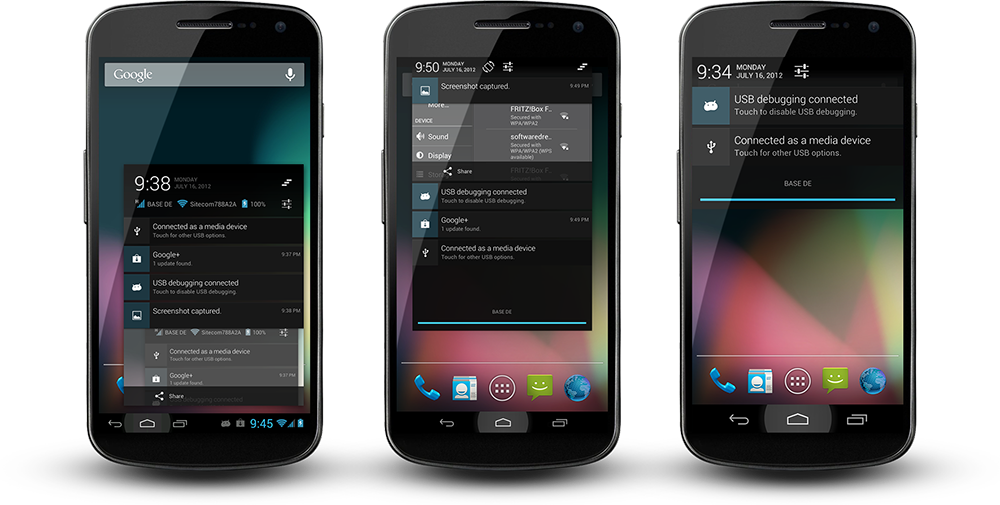
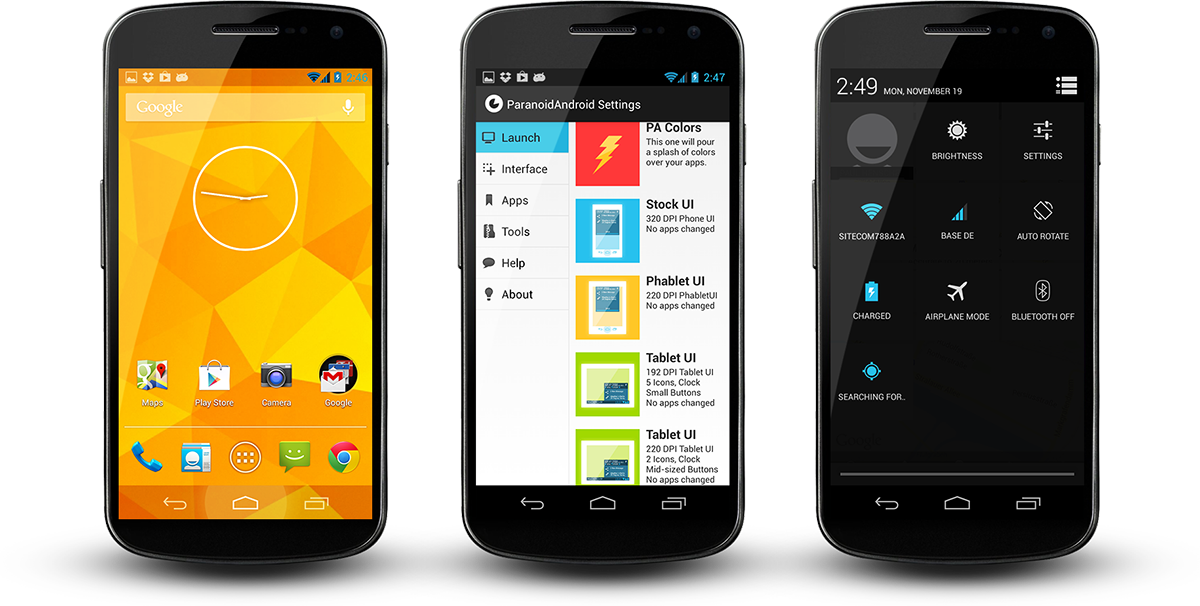
  • Hybrid engine ported, Per App DPI and Per App Layout
  • Tablet UI back from the dead
  • Per app color
  • Quicksettings -> Quicktoggles (first draft, more to follow)
  • New recents implementation
  • We fixed the aosp lag in the recents view, well, most of it
  • New SystemUI Icons that can cope with transparent bars, thanks go to John Xionidis
  • See through Lockscreen is back
  • Transparent bars + Launcher2 modified to cope with it
  • 4.2 Walls and Sounds
  • Google stock apps
  • Extended Desktop


PER-APP-DPI/LAYOUT
This is not tablet mode! Hybrid engine allows you to target apps individually. You get to pick their actual layouts which can tranform content drastically. Keep in mind, this has nothing to do with build.prop hacks or DPI changes. We list all layouts an app brings, you choose one, its as easy as that. It does not matter if your device runs itself in Phone-, Phablet or Tablet-UI, your apps will always look as you like. On top of that you can scale apps, to fit your screen, that way you can even bring full fledged tablet apps and make them run perfectly. Nothing will break, nothing will shrink, your market will be fine. Additionally we have rewritten many parts of the android framework and fixed countless of AOSP bugs to make way for these modifications - our "tablet mode" runs better on a phone than on a real tablet, that is guaranteed.


PER-APP-COLOR
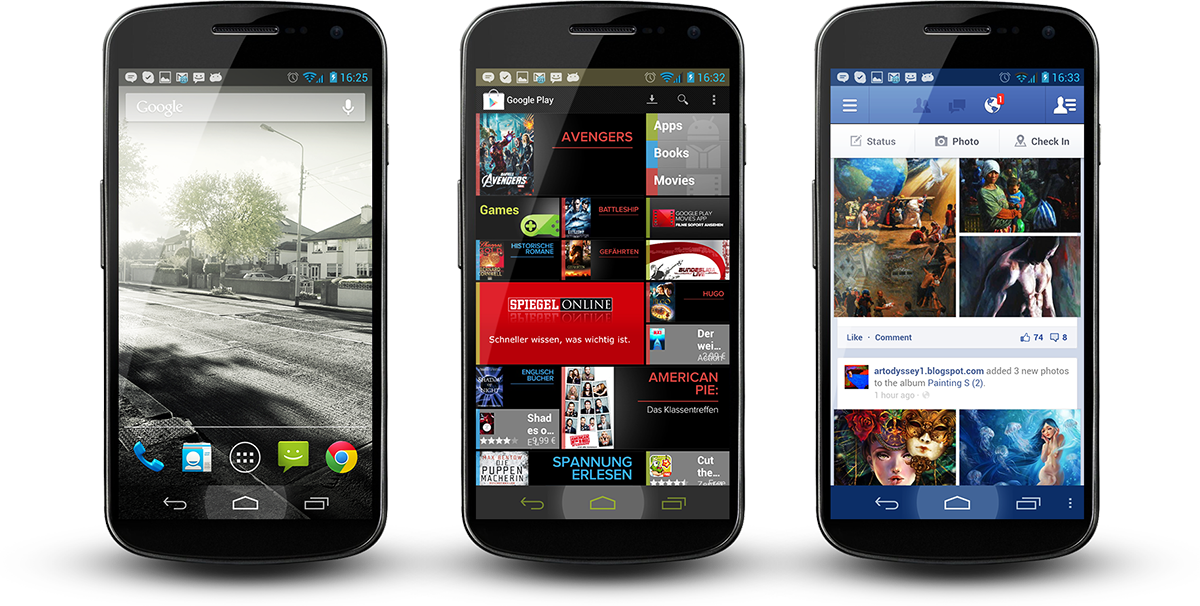
ParanoidAndroid's newest invention. Define apps in your regular hybrid panel. See your phone fade into the color definition of your current app, press home or go elsewhere and it fades back. Create as many combinations you like, you can even dabble with opacity. This feature is made possible by our hybrid engine, which is unique to this rom.

News : CyanogenMod 10.1 Introduces The Chronus Clock Widget, Timed For Release In Nightlies Starting Today

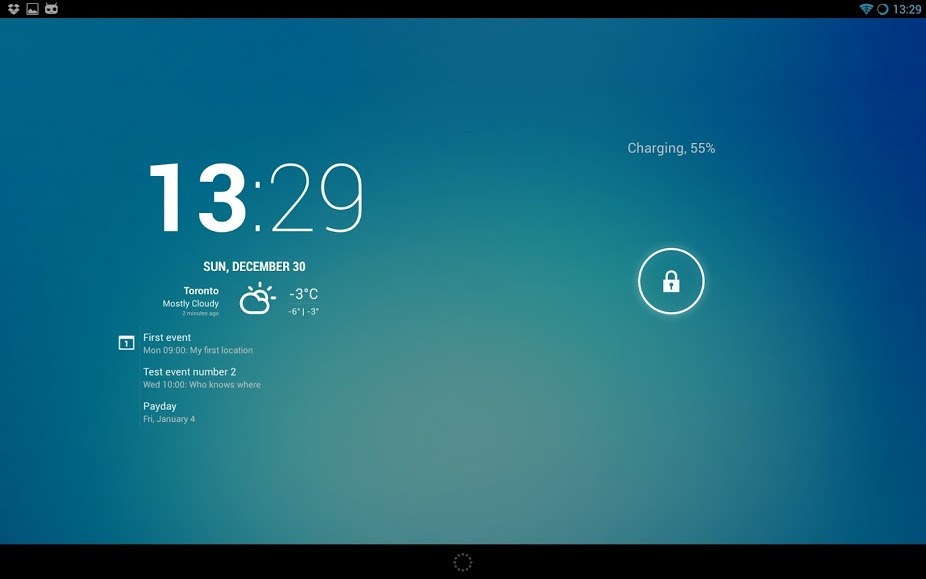
CyanogenMod just announced that CM 10.1 builds starting with nightlies released today will be getting a brand-new clock widget called Chronus (initially known as 'Lock Clock'). It works both as a homescreen and lockscreen widget, is configurable, and provides extra information in the form of calendar events and weather. 
Screenshot_2012-12-30-13-29-56
It works on both phones and tablets, and in lockscreen widget mode, appears collapsed and must be expanded in order to view additional information (this could later change with a settings toggle). Other than that, there's not much to know. It's a clock, it tells you the time, and it looks kind of nice.

News : AOKP Fresh Build Rollout With Jelly Bean 4.2 - Build 1 For Galaxy Nexus, Nexus 4 And Nexus 7 Available Now

Good news, ROM enthusiasts: the Android Open Kang Project has released the much-anticipated first build of 4.2. Bad news: it's a completely new ROM, built from the ground up. That means that it won't be quite as feature-packed as you remembered, and device support is limited to the more popular Nexus models, at least for now. You'll also need to install a recovery that's compatible with 4.2 ROMs (the latest ClockworkMod and TWRP should do the trick) and do a full data wipe of your previous ROM. Warm up Titanium Backup.
jerryrice
For the MR1 release, only the Galaxy Nexus (Verizon and GSM flavors), Nexus 4 and Nexus 7 builds are available. On the bright side, most of the customization functions have already been brought over to the new builds, including customizable Navigation Bar targets and the like. The AOKP team even managed to cram a few new features in there, including unlimited lockscreen widgets, statusbar transparency, and fully customizable 4.2 statusbar toggles. The only real issue with the ROM so far is spotty support for the new multi-user function.
Downloads for the MR1 release and Gapps can be found at the link below. The next release, which should come in 2-3 weeks, will (hopefully) add support for the more prolific Galaxy phones.
Devices
  • maguro – Galaxy Nexus (GSM)
  • toro – Galaxy Nexus (Verizon)
  • grouper – Nexus 7 (WiFi)
  • mako – Nexus 4
Features
  • General UI
    • Custom boot animation
    • Custom carrier label
    • Notification background
    • Statusbar brightness slider
    • Recents RAM Bar & Kill All button
    • Power menu options
  • Lockscreen
    • Customizable text color
    • Volume wake & music controls
    • Allow any kind & unlimited number of widgets (new)
  • Navigation Bar
    • Fully customizable NavBar (buttons, color, transparency, widgets, etc.)
    • Menu arrow keys while typing (new)
    • Customizable NavBar Ring
  • Statusbar
    • Battery indicator styles
    • Clock styles
    • Signal styles
    • Statusbar transparency (new)
    • Customizable Statusbar Toggles (new, based on Google’s tiles)
  • LED Control
  • Custom Vibrations
  • Sound Settings
    • Less frequent notification sounds
    • Headphone action
    • BT connect action
    • Flip action
    • Quiet Hours (CM)
    • Disable safe headset volume warning (new)
  • Themes support (multi-user support still buggy, use at your own risk)
  • NFC Polling modes

[ROM 4.1.2 - 4.2] JELLYBAM - v3.2.0 [24/12] [i9300] [PA.AOKP.CM10] [CHRISTMAS TIME]

Tuesday, 25 December 2012


Welcome to JellyBam


Why choose JellyBam? A developer can say whatever he want about his ROM (Ex. that his ROM is the best in the world) but what about hearing what are people saying about JellyBam? You can read users feedbacks and reviews here!

---------------------------------------------------------------------------------------


---------------------------------------------------------------------------------------

The unique method i actually have to speak with all JellyBam users is trough the Official JellyBam facebook page, but also we are glad to announce that our forum is alive with a section for every device that is now alive on tapatalk too (Search for JellyBam - iGio90). Also don't forget to visit our blog for downloading latest themes and mods for your JellyBam ROM! 

---------------------------------------------------------------------------------------


---------------------------------------------------------------------------------------


Quote:
- Built from source -
- Overall features of AOKP, CM10 and PARANOID -
- Custom JellyBam Settings with preferences -
- Tons of customizations -
- Themes and Mods in JellyBam style -
- Latest CM10/AOKP Kernel compiled from sources -
- Latest Siyah kernel -
- Google apps included -
- New Mali driver -
- Exynos HWComposer -
- Lockscreen with x8 Custom app targets -
- New optimus 4x circle lockscreen -
- Ability to customize color and alpha of the optimus lockscreen -
- KeyBoard from 4.2 - 
- Clock from android 4.2 -
- Google play music from android 4.2 -
- Sony Walkman music player -
- Bravia Engine libraries -
- Bravia XLoud audio libraries -
- Paranoid Android settings -
- Per-App-DPI Changer -
- Per-App-Color -
- Custom home action and hardware button in lockscreen -
- Quick/Long click on weather and clock actions -
- JellyBam Panel in settings app -
- AOKP and CyanogenMod Settings -
- Mass storage mode -
- OTA Update via UpdateMe App -
- You can keep your ROM up to date with latest Tweaks, Mods, Themes via UpdateMe app -
- GAPPS included, no need to flash anything else -
- Gallery support picasa share -
- Apollo Music Player (Themed) -
- Album app from sony xperia -
- Quick SMS -
- AwesomBeats Lib -
- A good combination of stability and performance (Thanks Siyah Kernel + Personal mod) -
- Bluetooth hacked for send / receive APK -
- YouTube hacked with 3G+WiFi HD 720p PlayBack -
- Init.d scripts -
- JellyBOOM script -
- Media quality tweak -
- 3G and GPS Tweak -
- RAM Optimization + Multitasking -
- SmoothScrolling tweak -
- V6 Supercharger included -
- lot of Themes available in UpdateMe -
- TouchWiz 5 Launcher -
- Trebuchet Launcher -
-*Beats Audio by Dr Dre*(Powerfull bass) -
- Clearbass Sound by Sony*(Clear Bass) -
- Xloud by SonyEricsson*(higher sound volume and clearer sound on speaker) -
- Dolby Digital Sound*(Equalizer enhancer bass setting and Surround setting) -
- Surround Sound*(Deeper bass and reduction of bass distortion plus Eq setting support) -
- JellyBam custom Bootanimation by metallaxis -
- Center Clock/No clock/Right Clock -
-Volume Panel (Volume Rocker allows you to change ALL volume levels in one Menu) -
- Lockscreen Weather -
- Lockscreen Vibration on/off toggle -
- Performance/Color Settings -
- Brightness Control Slider -
- Multilang -
- JellyBam Style -
- Much more! Check it by yourself! -

- All the amazing features of CM10, PARANOID AND AOKP ALL TOGETHER-
---------------------------------------------------------------------------------------


---------------------------------------------------------------------------------------


Quote:


project android_frameworks_base:
* Minor MTP correction
* Default merry christmas wallpaper by bliss (If you are updating the ROM, enable system theme from theme chooser to display it)

project android_jellybam:
* Replaced stock Google play store and framework services with hacked multi DPI
* Some minor modification in JellyBOOM (Battery saver)
* Enhanced GPS and 3G speed (Should works good now)
* Removed 4.2.1 Camera from p970 devices, revert to stock

project*android_packages_apps_Camera (4.2.1)
* Updated german translation
* Extend supported exposure compensation range
**Update Russian Translation
* Added Italian translation
* Added hungarian translation
* Added PT-BR translation

project android_device_sony_blue-common:
* Update wpa_supplicant config

project*android_frameworks_av:
* Stagefright: add support for samsung proprietary omx

project*android_packages_apps_Bampapers:
* Christmas wallpaper by bliss merged into BamPapers app

Thanks for the support and the effort provided for JellyBam! With this Christmas release we would like to say a Merry Christmas to all our users and an happy new year! 

We are working hard every day for improve and let jellybam become the best rom ever created, if you enjoy it, please, consider a small donation to us by clicking this link! thank you
---------------------------------------------------------------------------------------

---------------------------------------------------------------------------------------


---------------------------------------------------------------------------------------

How to install (If you are coming from another ROM):

- Download the ROM -
- Copy the zip file to your SD/Internal card -
- Enter recovery mode -
- Wipe data/cache (only if you are coming from a different rom, Updating my rom doesn't need a factory reset) -
- Flash the zip -
- Enjoy -
How to install (If you are updating the ROM):

- Download the ROM -
- Copy the zip file to your SD/Internal card -
- Enter recovery mode -
- Flash the zip without wiping nothing! -
- Enjoy -

---------------------------------------------------------------------------------------

Bugs:

- CM10, AOKP Know bugs -

---------------------------------------------------------------------------------------


---------------------------------------------------------------------------------------


---------------------------------------------------------------------------------------


---------------------------------------------------------------------------------------


DOWNLOAD

---------------------------------------------------------------------------------------

[ROM][Dec 25][OneX] Jellybean 4.2.1 for Endeavoru AOSP Build [WIFI Tethering] [ANY HBOOT]


Banner by Sebianoti

Me and rogro82 started to port Android 4.2 to the HTC One X - this release is an early preview.


Working
  • Wireless
  • Phone calls
  • GSM Data
  • Audio
  • Video Playback (including HD)
  • Camera (no photosphere - blame google)
  • GPS
  • NFC
  • Works with any HBOOT version
  • Bluetooth file transfer, tethering and input devices (HID -> keyboards)
  • Wireless tethering

Not Working
  • Bluetooth Audio devices
  • ..and probably some other things.

Installation instructions
  • BACKUP YOUR DATA (using CWM)
  • Verify that your backup is complete - a backup of your sdcard may also be a good idea (see below)
  • Download the ZIP and the boot.img (see Downloads)
  • Copy the .zip to your sdcard and reboot into fastboot
  • fastboot flash boot boot.img, then boot into recovery
  • WIPE your phone (this is not optional)
  • Install the .zip and reboot

SDCARD Notice
Android 4.2 significantly changes the way how sdcards are handled internally, due to this we dropped USB Mass storage support. This build does only support MTP!
Also note that the ROM will move your data from /sdcard/ into /sdcard/0 on first boot (0 is the 'home directory' of the default user). If you go back to 4.1.2: Don't forget to move the data in 0/ back to the root of your sdcard.


Going back to 4.1.2
If you go back to your old 4.1 backup: Do not forget to re-flash your 'old' boot.img.
Also note that you'll have to move your migrated data from /sdcard/0/ back to /sdcard/ (CWM doesn't know about /sdcard/0/ yet).
This can be done via (while booted in CWM):
Quote:
adb shell
cd /sdcard/0/
mv * ../
mv .* ../
cd ..
rmdir 0

Changelog

RC8 (20121225)
  • Fixed WIFI Tethering
  • Changed halo background
RC7 (20121220) Doomsday edition
  • Bluetooth Tethering support (still a little bit flaky, try to re-enable bluetooth + tethering if the connection drops)
  • Changed quicksettings behaviour: Short press = toggle / Long press = open settings
  • Reboot + Screenshot options in Power-Off menu (thanks to lownoise2)
RC6 (20121219)
  • Support for Bluetooth file transfer and HID (Again: thanks to rogro82)
  • AUDIO AND INTERNET SHARING VIA BLUETOOTH ARE CURRENTLY NOT WORKING
RC5 (20121215)
  • Audio recording fixed (Send your thanks to rogro82)
  • Developer-Options enabled by default in Settings
  • Display internal + sdcard storage in Settings
  • Improved holo-background gardient
  • Switching from/to 2G-Data-Only works without reboot
  • 'Silent' GSM-Data drop is hopefully gone
RC4 (20121211)
  • Camera support Install this if the camera icon is missing in your app drawer
RC3 (20121209)
  • Paid applications can now be installed using Play Store
  • Unity engine based games work correctly
  • Hboot 1.3x support
RC2 (20121202)
  • Multitouch fixed
  • Based on Android 4.2.1 (December fixed)
  • HD-Videos (OMX) working

RC1 (20121126)
  • Include Email.apk
  • Fix google location service provider (google now / gmaps)


Download links (always flash boot.img!)
http://blinkenlights.ch/static/andro...oru_42/latest/ (Primary host in Germany)
http://android.eqmx.net/android/endeavoru_42/latest/ (Mirror in Sweden)
http://cktouch.com/xda/HTC_Endeavoru_JB_42/Latest/ (Mirror in US)
Gapps download
NEW http://goo.im/gapps/gapps-jb-20121212-signed.zip

[ROM] [23DEC] One X [AOKP] IceColdJelly421 - 1.1 - JellyBean 4.2.1_r1


.
.
.
.


.
.
.
.
.

In the beginning I would like to thank:
  • AOKP team
  • pabx for echo fix and other fixes
  • rogro82 - for fixes
  • TripNraVeR
  • CM team
  • richardtrip for audio fix


OneX IceCold Team:
  • LorD ClockaN - don't ask
  • TUN_SD - themer - pretty as his themes/mods
  • n3ocort3x - kernel boy - clumsy as his kernels
  • semdoc - tester - thorough as his line of work (ask him what's his job!!)
  • icke - main thread helper and tester


Now we can move on...


DONATIONS:

I'm not writing this because of lack of donations, but to get the priorities straight..
AOKP team deserves it more then IceColdTeam, so go to ROMControl/about and open your wallet 
If you would like to make a donation for this ROM, don't do it only for me!!!
Consider whole IceCold Team, not only the individual.


Latest Stable Release
ONLY FOR ONE X INTERNATIONAL, TEGRA 3 VERSION - I don't want any more bricked devices!!


Download folder: http://goo.gl/804Zg
Actual version: IceColdJelly421 V1.1 - 23-12-2012


What's New
  • Flash boot.img!!
  • Fixed BT (A2DP still has some issues) - thanks to rogro82 and pbax
  • Fixed WLAN tethering - thanks to rogro82
  • Merged all new stuff from AOKP till now (check ROMControl for new stuff)
  • Add an "Automatically Connect" option for WiFi networks (Settings) - CM
  • Button backlight is now always ON while screen is ON until better soltion is found that follows light sensor - rogro82 and pbax
  • Add National data roaming and make it optional (for those who need it)
  • Hide Adb Notification icon option - CM
  • Added more LCD backlight values to try to smoother the light change transition
  • Increased WLAN scan interval from 100 to 240 seconds
  • Updated Emal app with patches from CM and AOSP master branch
  • And a lot more under the hood
  • Battery still isn't at the 4.1 base level...


What's Broken
everything that is mentioned in TeamNDVRu's thread:
  • A2DP for BT still has some issues
  • WiFi direct
  • In call volume adjustment works, but not fully well in Speaker mode
  • MHL output is rotated incorrectly to portrait in horizontal mode (but workaround added since alpha 8 for hw decoded videos/youtube. Use bsplayer from playstore, almost all videos play with it in correct rotation in hwoverlay)
  • No FM radio app in ROM. But Spirit FM works from market (it's commercial!)
  • Probably some more stuff


ROMS
ROMS should contain everything you need to enjoy JB. You are not required to install any Add Ons, simply download the latest ROM, gapps, flash it, and go!
You are STRONGLY recommended to fully wipe your device before flashing, and if possible avoid restoring system apps and system data with Titanium Backup - these can cause stability issues that are very hard to debug. If you believe you know what you're doing - then fine, go ahead, but please don't complain if you experience strange behavior.


How to flash:
  • turn OFF your phone
  • BACKUP your data using recovery (and SD on first flash just in case)
  • boot in bootloader
  • select fastboot mod
  • flash boot.img via fastboot that is located in the rom.zip: fastboot flash boot boot.img
  • run this command now: fastboot erase cache
  • go back to hboot screen
  • select recovery
  • full wipe is recommended if coming from sense, if coming from other AOSP roms than not
  • flash the rom
  • flash newest gapps (Google applications) from here -they NEED to be flashed after every ROM flash
  • boot


Instructions and notice taken from pbax's thread:

SDCARD Notice
Android 4.2 significantly changes the way how sdcards are handled internally, due to this we dropped USB Mass storage support. This build does only support MTP!
Also note that the ROM will move your data from /sdcard/ into /sdcard/0 on first boot (0 is the 'home directory' of the default user). If you go back to 4.1.2: Don't forget to move the data in 0/ back to the root of your sdcard.

Going back to 4.1.2
If you go back to your old 4.1 backup: Do not forget to re-flash your 'old' boot.img.
Also note that you'll have to move your migrated data from /sdcard/0/ back to /sdcard/ (CWM doesn't know about /sdcard/0/ yet).
This can be done via (while booted in CWM):

Code:
adb shell
cd /sdcard/0/
mv * ../
mv .* ../
cd ..
rmdir 0

 
DroidXDA © 2012 | Designed by Bubble Shooter