Showing posts with label UG802. Show all posts

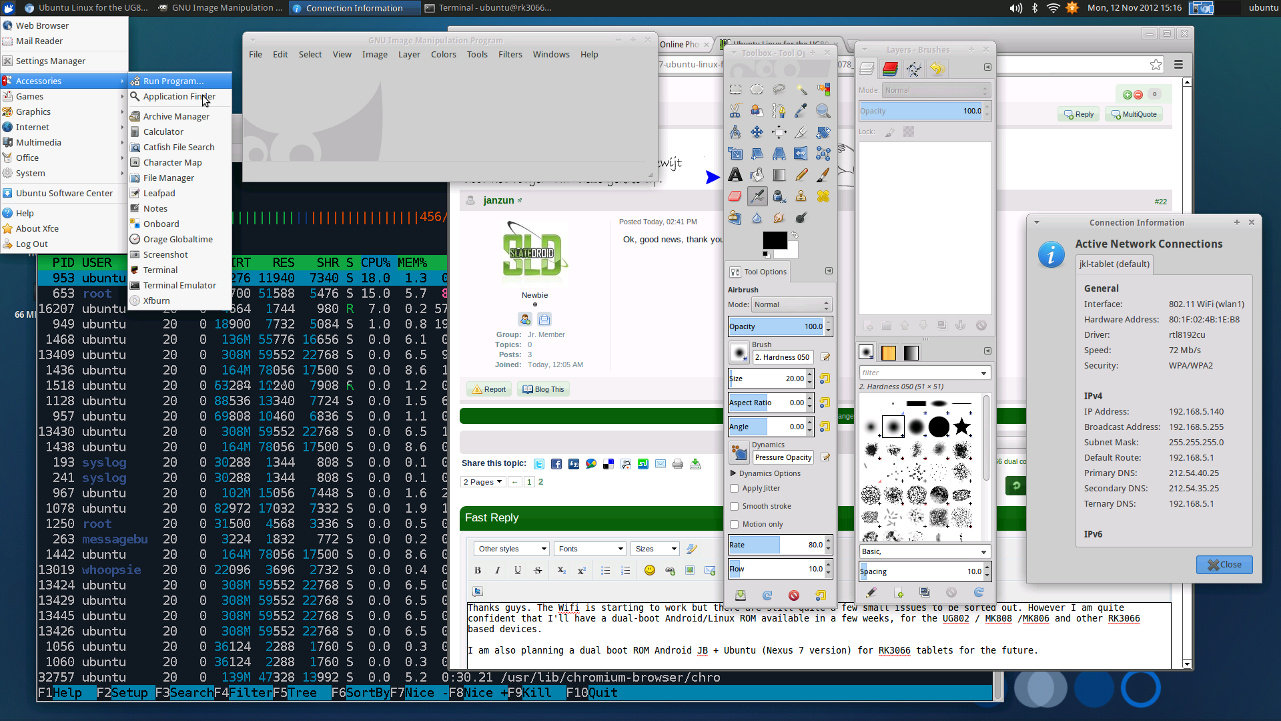
Preliminary Version of Ubuntu Running on UG802 mini PC (Rockchip RK3066)

Monday, 12 November 2012

(AndrewDB) had started working on a port of Ubuntu for the platform. It appears he has been pretty busy, as there has been some progress in the meantime…

Ubuntu Running on UG802 mini PC (Click to Enlarge)
AndrewDB managed to run Ubuntu on UG802 HDMI Stick. Wifi is starting to work, although there are still some minor issues to resolve. He plans to have a dual-boot Android/Linux ROM available in several weeks for RK3066 based devices such as the UG802 and MK808. Eventually, AndrewDB also intends to release a dual boot ROM Android Jelly Bean + Ubuntu for RK3066 tablets.
That’s all the information I have for now. This is still work in progress (See TODO List) and no binary has been released yet.
Via: SlateDroid

[ROM][ROOT]Finless ROM 1.4 for the UG802 mini PC: Root access, more app storage space

Thursday, 4 October 2012

The UG802 is a tiny, inexpensive mini PC with a Rockchip RK3066 dual core ARM Cortex-A9 processor. It looks like a USB flash drive, but it’s a fully functional little computer with an HDMI connector at one end and a USB port at the other.
That lets you plug it right into a TV or monitor, while hooking up a keyboard and/or mouse for input.
Out of the box, the UG802 runs Google Android 4.0. But if you’re not happy with the default software, FreakTab’s Finless has put together a custom version of Android with a number of enhancements.
UG802
Finless ROM 1.4 for the UG802 is pre-rooted, and allows you to run apps that require root access or alter files and folders that would otherwise be protected.
It also includes:
  • A Google Play Store fix that lets you view most apps in Google’s store
  • A stock Android 4.0 app launcher (which you can use instead of the UG802′s custom launcher if you want)
  • A reboot app that lets you reboot the UG802 without pulling the plug (since there’s no power button)
  • Option to repartition the storage space to provide 1GB of app storage (which is nearly twice what the UG802 ships with)
Finless has also removed some apps to save space. You can always download them from the Play Store if you really need them.
There are two ways to install Finless ROM. You can just download the .img file, copy it to a microSD card, insert it in the UG802 and reboot the device. But that won’t let you modify the app storage partition.
To do that, you’ll need to run a PC utility to reformat the internal storage and flash the new ROM. It’s a little more complicated, but if you run into any trouble you can find troubleshooting tips (or post questions) and the FreakTab forum.
Also make sure to read the README FIRST text file included in the ROM download before you get started. It contains a lot of useful information.
Finless ROM flash installer
It should probably go without saying that installing a custom ROM like this will probably void your warranty… if you managed to get a warranty at all.
But with UG802 mini computers selling for as little as $65, it’s probably not the end of the world if you break something and can’t figure out how to recover your device.

How to :Rooting the UG802 Android Mini PC, installing custom recovery

Tuesday, 25 September 2012


The UG802 is a USB thumb drive-sized computer-on-a-stick. It has a Rockchip RK3066 dual core processor, 1GB of RAM, 4GB of storage, HDMI and USB ports, and runs Android 4.0 software. You can pick one up for under $70, plug in a monitor, keyboard, and mouse and use it like a cheap desktop computer.
But if you want to get a little more out of your device, Mindbuntu has instructions for rooting the UG802 and installing ClockworkMod custom recovery.
UG802
Rooting the UG802
When you root an Android device, you gain access to files, folders, and settings that wouldn’t otherwise be available. This lets you do some nifty things like creating detailed backups of all your system data as well as apps (including saved games or other important data).
Mindbuntu notes that you can use a modified version of SuperOneClick to root the UG802, following instructions from SlateDroid for a device with similar hardware.
One of the things you can do once you’ve rooted the UG802 is apply a Google Play Store fix so that you can access all the apps in Google’s app store.
Mindbuntu has instructions for applying that fix — but bear in mind, if anything goes wrong, it could cause your UG802 to behave in unexpected ways (such as not booting).
Installing ClockworkMod
ClockworkMod is a custom recovery utility that replaces the default recovery service that comes with your Android device.
Once installed, instead of booting directly into the Android operating system, you can boot into ClockworkMod to install operating system updates, software patches, or make other changes. You can also wipe your system, delete your cache, or perform other cleaning actions.
ClockworkMod also lets you make a complete backup of your device. It’s a good idea to do this before making any major changes, because if anything goes wrong, you can always restore from that backup snapshot (assuming you can at least boot into recovery).
Mindbuntu has instructions for installing ClockworkMod on the UG802.

[News]UG802 Rockchip RK3066 Android mini PC priced as low as $69

Thursday, 13 September 2012

The UG802 Android mini PC seems to be following a path blazed by the MK802before it. Both of these are tiny PC-on-a-stick devices that look like big USB thumb drives.
But they actually include processors, memory, storage, and input and output ports, letting you connect a monitor, mouse, or keyboard and use them like little, low power Android computers.
When the UG802 first went on sale last month, retailers were charging around $89 for the mini PC. Now you can pick one up for just $69.
UG802 Android mini PC
The UG802 features a Rockchip RK3066 ARM Cortex-A9 dual core processor, 1GB of RAM, and 4GB of storage. It features a microSD card slot, HDMI and USB ports, and built-in WiFi.
The CPU should make the little box noticeably faster than the MK802, which has a single core ARM Cortex-A8 chip. The advantage to picking up an MK802 at this point is that there are already a variety of Linux-based operating systems including Fedora and Ubuntu which have been ported to run on the platform. That hasn’t happened yet with the UG802, but I suspect it’s just a matter of time.
Like the MK802, the UG802 is manufactured in China and sold by a number of different distributors. And like the MK802, the pricing seems to vary pretty greatly from one retailer to the next.
A number of sellers are offering the UG802 at AliExpress for $69 and up — but be careful to make sure you’re getting what you pay for. Some AliExpress sellers have a habit of writing misleading information in their headlines or product descriptions (which is why you get a lot of listings that have both UG802 and MK802 in the headlines).
Meanwhile PandaWill is selling the device for $69, and offering lower wholesale prices for resellers.
OvalElephant has also knocked a few bucks off its price. The company had been charging $90 for the UG802, but now you can get one for $87.

 
DroidXDA © 2012 | Designed by Bubble Shooter