Showing posts with label PC STICK. Show all posts

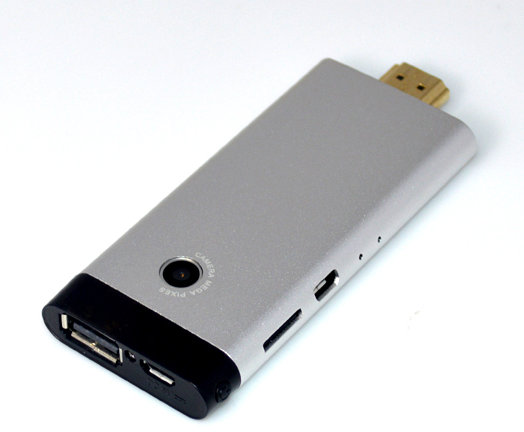
Kimdecent B12 Rockchip RK3066 HDMI TV Dongle Features a 2MP Webcam

Tuesday, 8 January 2013


Kimdecent has added a new Rockchip RK3066 Android 4.1.1 mini PC to its offering. The device comes with 1GB RAM, 8GB Flash, Wi-Fi & Bluetooth connectivity, and a feature I’ve never seen in any other PC-on-a-stick: a 2 MP camera for video conferencing with Skype or Google talk.
Kimdecent B12Apart from the webcam, the rest of B12 specifications are very similar to MK808:
  • SoC – Rockchip RK3066 dual core Cortex A9 @ 1.6GHz + Mali400 quad core GPU
  • System Memory – 1GB RAM
  • Storage – 8GB ROM + microSD slot (up to 32GB)
  • Connectivity
    • WiFi 802.11/b/g/n 150Mbps
    • Build-in Bluetooth 2.1
  • USB – 1x Full Size USB 2.0 + 2x micro USB ports
  • Video Output – HDMI 1.4 output+ AV output
  • Camera – Build-in 2MP webcam
  • Audio I/O – Mic
  • Misc – Hardware Standby key, software power off key, and recovery hole.
  • Dimensions – 97.5 x 39.8 x 9.8mm
  • Weight – 42g
The package contains Kimdecent B13 Android Mini PC, a power supply, a USB Cable, an HDMI Cable, an OTG cable, an AV cable, an “hold” kit, and a user manual in English.Kimdecent B12 AccessoriesThe “hold” kit (there must be a better word) is used to hold the mini PC horizontally in order to use the webcam. I’m not sure how convenient this is compared to a standard USB webcam connected to a mini PC.
The firmware has been improved with software power off, and video playback is now full screen (Status bar hidden). This is the mini PC with the most features I’ve seen, and it costs $67.99 on Kimdecent shop on Aliexpress. I could not find it on other shops for now.

CES 2013 : Dell introduces HDMI stick that turns any screen into a thin client PC

Dell acquired Wyse last year and launched a line of cloud computing products that lets you access software data on a remote server. Most of the products in this line look like tiny computers which you can connect to a keyboard, mouse and display.
Now the company is introducing a new thin client that you can put in your pocket, and it’s aimed at the consumer market rather than enterprise.
Dell Project Ophelia
Dell’s “Project Ophelia” looks like a kind of big USB flash drive. But if you plug it into a TV or monitor it lets you access your music, movies, pictures, and other data stored in your “personal cloud” using Dell Wyse Cloud Client software.
You can also play games, access documents, and perform other PC-like tasks on a TV with a Project Ophelia stick plugged in.
For the most part these apps aren’t actually running on the Project Ophelia — instead you can login to a remote PC or virtualized PC environment. Dell says the software supports Cirtix, VMware, and Microsoft back-end systems.
The stick features WiFi and Bluetooth and it can draw power directly from your display — if your display has an MHL port. If not, you can connect it to an HDMI port and plug in a USB power cable.
While Dell is emphasizing Project Ophelia’s cloud client capabilities, under the hood this thing is running Google Android 4.0 which means you can also use it to surf the web, check your email, play media or run other Android apps without logging into a virtual desktop at all.
In other words, Dell is getting into the Android TV stick business, but unlike the companies selling cheap white box Chinese TV sticks, Dell is positioning its device as a thin client.

News : Allwinner introduces dual and quad-core tablets

Tuesday, 11 December 2012

Chinese chip maker Allwinner has introduced two new processors for tablets, TV sticks, and other low power devices. They’re dual and quad-core chips called the Allwinner A20 and Allwinner A31, respectively.
Allwinner A31
Allwinner A31
The Allwinner A10 single-core chip has been a relatively popular chip with Chinese device makers due to its low price and decent performance.
That’s the processor that powers the original MK802 Android 4.0 Mini PC and a number of other mini PCs. It’s proven popular with tinkerers, because Android isn’t the only supported operating system. Users have been installing Ubuntu and other Linux-based software on Allwinner A10 devices for months, and the PengPod line of tablets are expected to ship soon with a desktop Linux operating system preloaded.
While the Allwinner A10 is a single core ARM Cortex-A8 processor with Mali 400 graphics, Allwinner’s new chips feature faster ARM Cortex-A7 cores and more powerful graphics.
Allwinner A20 dual-core
Allwinner’s A20 is a dual core chip with 512KB of L2 cache and 128KB of L1 cache, dual-core Mali 400 graphics, and support for 2160p HD video playback.
This chip is pin-to-pin compatible with the Allwinner A10, which means that device makers should be able to quickly and cheaply upgrade existing designs to feature the new processors.
Unfortunately there doesn’t appear to be any official support for Linux yet... but it’s not out of the question.
Allwinner A31 quad-core
This quad-core chip features 1MB of L2 cache, 256KB of L2 cache, and PowerVR SGX 544 graphics. It supports 4K ultra high definition video decoding.
While the A31 is also an ARM Cortex-A7 chip, it’s not pin-to-pin compatible with the company’s earlier chips the way the Allwinner A20 is. And since the PowerVR graphics are licensed from Imagination Technologies (a company that’s not known for releasing source code), it’s unlikely that we’ll see strong Linux support for this chipset.

News : FXI Cotton Candy $199 PC-on-a-stick hits general availability

Thursday, 4 October 2012

The FXI Cotton Candy is a tiny computer with an ARM Cortex-A9 processor, Mali 400 graphics, and Android 4.0 software. It’s been in development for almost a year, and last week FXI started shipping the little PC-on-a-stick to customers that had pre-ordered.
Now the Cotton Candy store is officially open to the public, and anyone who wants to spend $199 on the little computer can pick one up.
FXI Cotton Candy
FXI cautions that the software is still a beta release meant for developers. Right now there’s no access to the Google Play Store, power management isn’t implemented, and video playback only works for certain video formats.
Future software updates will fix some of those issues, but if you’re looking for a fully functional USB flash drive-sized Android computer, there are better (and cheaper) options available right now, including the UG802 or G-Box Dyno.
But the Cotton Candy has a few features that those devices lack. First, it’s aimed at developers, and FXI offers an optional debug board accessory for $69. Second, the Cotton Candy includes software that lets you plug the stick into a Windows, Mac, or Linux computer to apps in an Android environment on your PC.
FXI Cotton Candy with Mac
So you can use the Cotton Candy as a standalone device by connecting a keyboard, mouse, and television. But you can also use it as a portable operating system on a stick that you can plug into nearly any computer.
The Cotton Candy has a 1.2 GHz ARM Cortex-A9 CPU, 1GB of RAM, a microSD card slot for storage, 802.11b/g/n WiFi, Bluetooth 2.1, a USB 2.0 port, a micro USB 2.0 port, and an HDMI port.
In addition to the Google Android build for the Cotton Candy, the device should be able to run Ubuntu or other Linux-based operating systems once they’re ported to run on the hardware.

 
DroidXDA © 2012 | Designed by Bubble Shooter